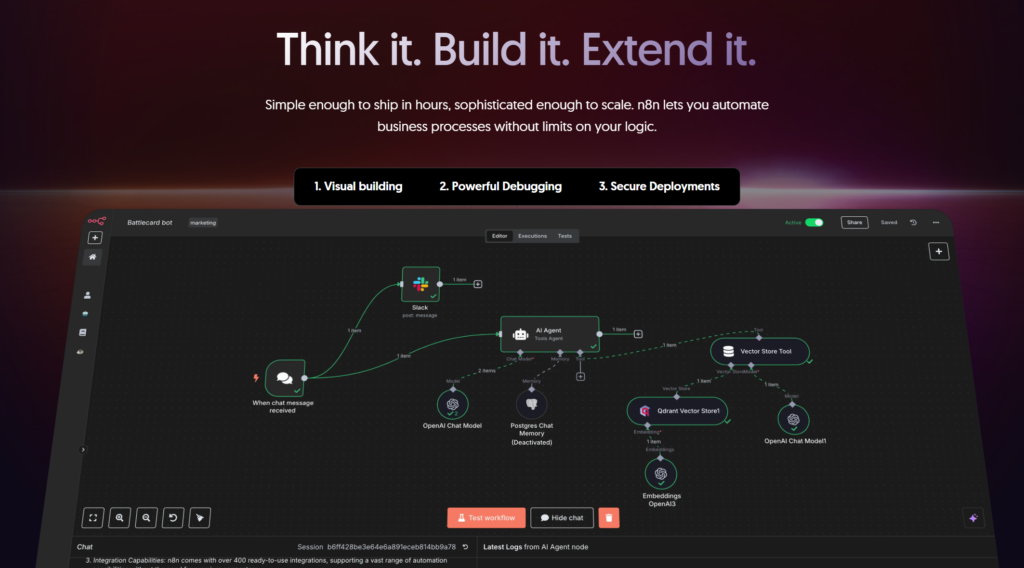
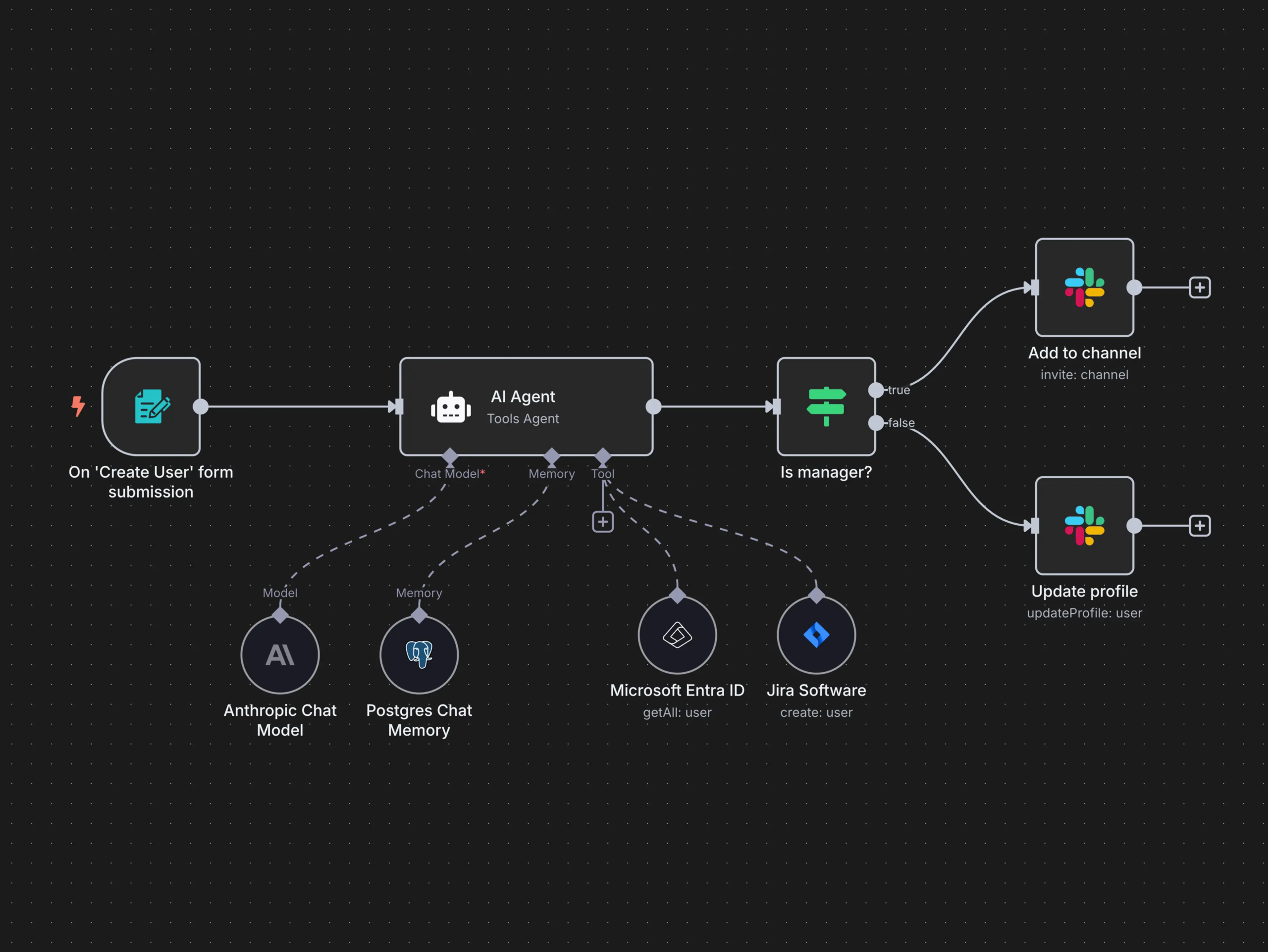
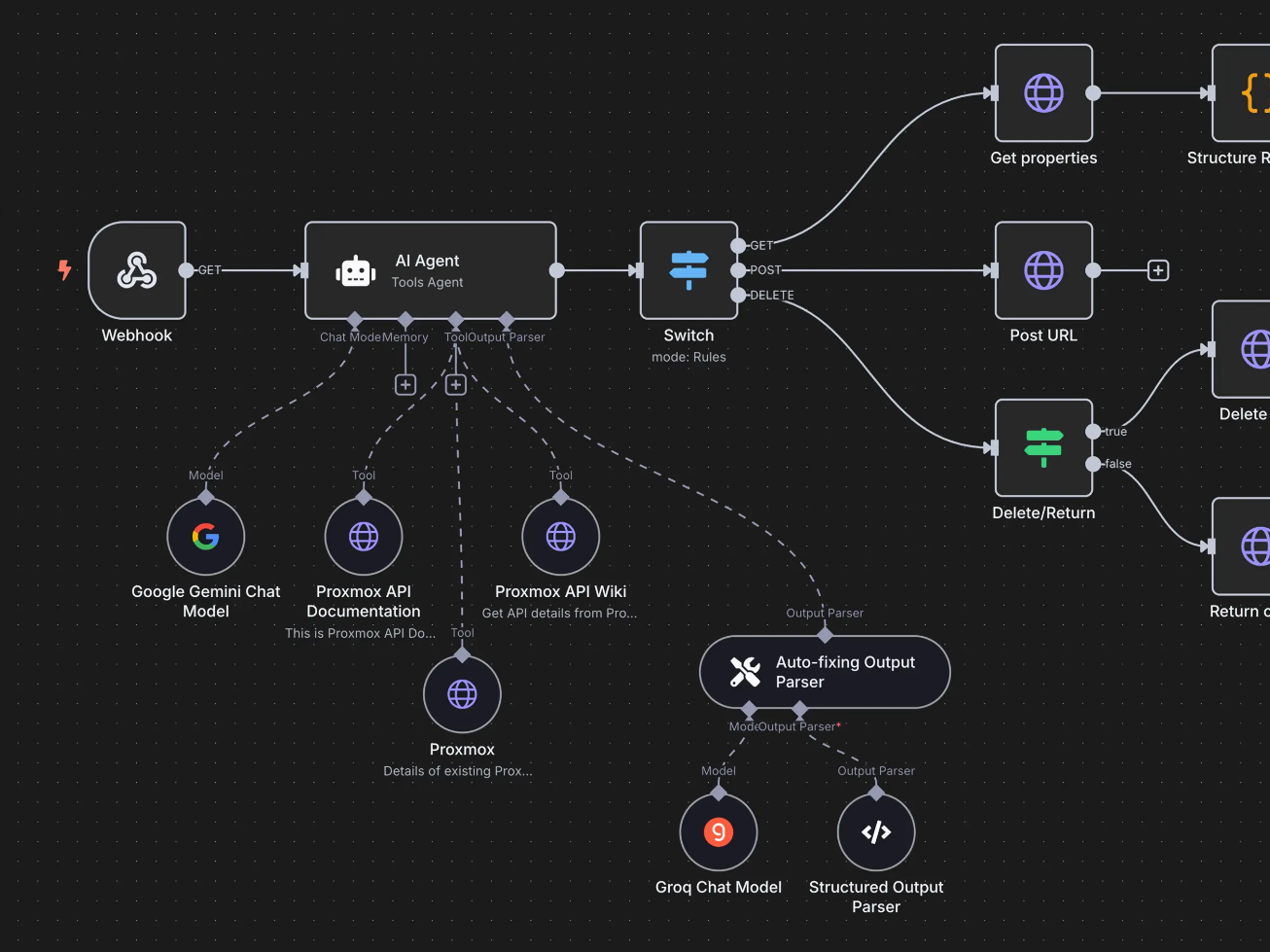
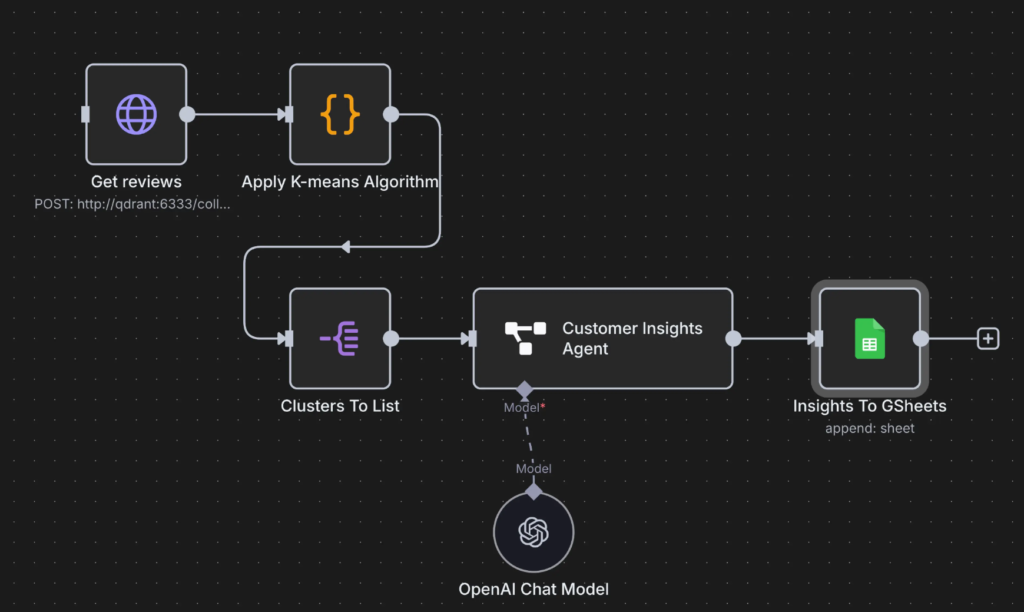
An n8n workflow is made of nodes connected by lines.
A typical flow looks like this:
Trigger Something starts the workflow (Webhook, form submission, new email, scheduled time, etc.)
Processing Data gets transformed, filtered, enriched, or analyzed (JavaScript, conditions, AI calls, formatting)
Actions Data is sent somewhere (Notion, Google Sheets, Slack, email tools, CRMs, APIs)
Each step passes structured data to the next one.
No magic. No black box.
Why n8n is different from other automation tools
If you’ve heard of Zapier or Make, n8n plays in the same space, but with very different philosophy.
1. You own the system
n8n can be self-hosted.
That means:
Your data stays with you
No per-task pricing anxiety
Full control over performance and scaling
For serious builders, this is huge.
2. Real logic, not toy automation
n8n supports:
IF / ELSE branches
Loops
Error handling
Custom JavaScript
API calls with full control
You’re not limited to “when X then Y”.
You can build actual systems.
3. AI-ready by design
n8n works extremely well with:
LLM APIs
AI transcription
Classification
Content generation
Agent-like workflows
This makes it perfect for AI-assisted businesses, not just task automation.
What can you do with n8n?
Here are practical, real-world use cases, not buzzwords.
1. Automate content pipelines
Example:
YouTube video → transcript
Transcript → AI summary
Summary → blog post
Blog post → newsletter
Newsletter → social snippets
Everything stored in Notion
One input.
Many outputs.
Zero repetition.
2. Build lead & client systems
Example:
Website form submission
Enrich lead data
Add to CRM
Send personalized email
Create follow-up tasks
Notify you on Slack
Your “sales brain” runs automatically.
3. Create AI-powered workflows
Example:
Receive raw text or voice note
Transcribe (AI)
Analyze intent
Categorize
Generate structured output
Save it in a database
Ask follow-up questions if unclear
This is where n8n starts feeling like an AI agent, not an automation tool.
4. Sync tools that don’t talk to each other
APIs, webhooks, databases, legacy tools.
n8n doesn’t care.
If it has an API (or even just HTTP access) you can integrate it.
n8n’s core capabilities (quick breakdown)
🔗 300+ integrations (and infinite via API)
🧠 Conditional logic & branching
🔁 Loops & batch processing
🧪 Custom JavaScript execution
🤖 AI & LLM integrations
🗄️ Database & Notion-style workflows
🖥️ Self-hosting & cloud options
🔐 Full data control & security
⚙️ Error handling & retries
In short: it scales with your brain.
Who is n8n for?
n8n is especially powerful if you are:
A creator building systems around content
A freelancer or consultant managing leads and clients
A solo founder who hates repetitive work
A technical-curious non-developer
Someone building AI-assisted workflows
If you like understanding how things work, n8n feels right.
Who n8n is NOT for (honestly)
People who want 1-click AI magic
Users who hate logic or structure
Teams that are not willing to systematize procedures
n8n rewards clarity and system thinking.
Final thought
n8n is not “another automation tool”.
It’s a system builder.
If you think in workflows, maps, and processes, n8n becomes an extension of your mind.
And once you automate the boring glue work, you finally get back what matters most:
Focus, leverage, and creative freedom.
Want to go deeper?
I regularly share practical breakdowns on n8n, automation systems, and AI agents, how they work, how to design them, and how to actually use them to save time and build leverage.
If you’re interested in thinking in systems and understanding these new tools, join the newsletter below 👇
This article explains what Retrieval-Augmented Generation (RAG) actually is, when it makes sense to use it, and when it might add unnecessary complexity.
Table of Contents
1. Why This Concept Exists (Problem First)
RAG did not emerge because language models weren’t smart enough. It emerged because knowledge and intelligence are two different things.
Modern LLMs are excellent at reasoning, synthesis, and language. What they are not good at is:
accessing private information
staying up to date
grounding answers in specific, verifiable sources
As AI systems started moving from demos to real products, this gap became impossible to ignore.
The Core Problem RAG Tries to Solve
Without RAG, AI systems are forced into a bad trade-off:
either answer confidently using incomplete knowledge
or refuse to answer when certainty matters
Neither option scales well in real-world applications.
This becomes a serious issue when:
information changes frequently
data is private or proprietary
correctness matters more than fluency
users expect answers grounded in their documents, not generic knowledge
What Breaks Without It
Without a retrieval layer:
models hallucinate when they lack context
long prompts become unmanageable
updating knowledge requires manual work or retraining
systems drift out of sync with reality
In short, intelligence becomes detached from information.
Why This Concept Emerged Now
RAG exists because three things happened at the same time:
LLMs became good enough at reasoning The bottleneck is no longer language or logic.
Context windows remained finite You still can’t load everything into a prompt.
AI moved into operational environments Where accuracy, trust, and traceability matter.
RAG is the architectural response to this shift — a way to reconnect intelligent models with real, changing knowledge.
Framing Statement
This concept exists because models can think, but they can’t remember everything.
Without it, systems struggle with accuracy, relevance, and trust at scale.
If you’ve ever wondered why an AI sounded smart but felt unreliable, this is the problem RAG was designed to address.
2. What Is RAG, Really?
RAG stands for Retrieval-Augmented Generation.
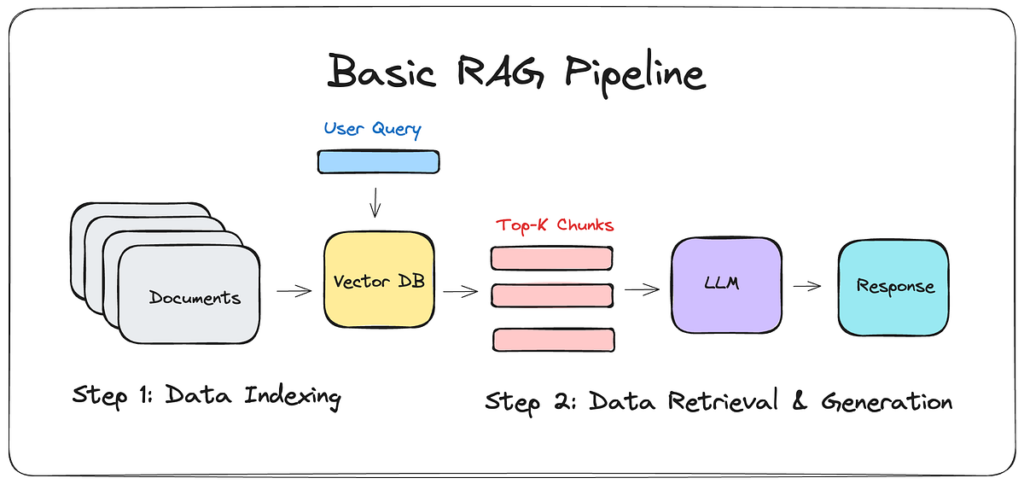
At its core, RAG is a way to make a language model stop answering purely from memory and instead look up relevant information first, then generate an answer based on that information.
Stripped of AI jargon, RAG is simply this:
An AI system that reads before it answers.
The core idea (plain English)
A standard LLM:
answers only using what it learned during training
has no access to your private documents or databases
may hallucinate when information is missing or unclear
A RAG system:
receives a question
retrieves relevant information from an external source
injects that information into the prompt
generates an answer grounded in that context
The model itself is not “smarter.” It just has access to the right information at the right time.
A useful mental model
Think of it this way:
LLM without RAG → a student answering from memory
LLM with RAG → a student allowed to consult notes before answering
The quality of the answer depends on:
the model’s reasoning ability
the quality and relevance of the retrieved information
What RAG is NOT
To avoid confusion, it’s important to be clear about what RAG is not:
❌ It is not fine-tuning
❌ It does not retrain the model
❌ It is not a guaranteed fix for hallucinations
❌ It is not always necessary
RAG does not change the model. It changes the context provided at inference time.
3. How RAG Works (Step by Step)
Let’s look at what actually happens under the hood, without unnecessary complexity.
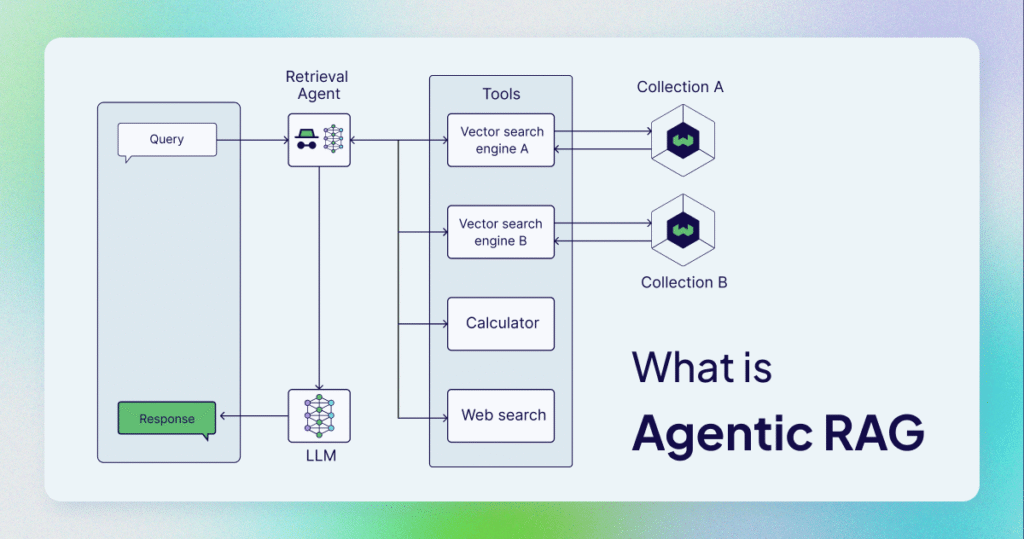
Most real-world implementations fall into a small number of recurring patterns. Understanding them helps you choose the simplest architecture that solves your problem, instead of defaulting to complexity.
Contains information related to marketing campaigns of the user. These are shared with Google AdWords / Google Ads when the Google Ads and Google Analytics accounts are linked together.
90 days
__utma
ID used to identify users and sessions
2 years after last activity
__utmt
Used to monitor number of Google Analytics server requests
10 minutes
__utmb
Used to distinguish new sessions and visits. This cookie is set when the GA.js javascript library is loaded and there is no existing __utmb cookie. The cookie is updated every time data is sent to the Google Analytics server.
30 minutes after last activity
__utmc
Used only with old Urchin versions of Google Analytics and not with GA.js. Was used to distinguish between new sessions and visits at the end of a session.
End of session (browser)
__utmz
Contains information about the traffic source or campaign that directed user to the website. The cookie is set when the GA.js javascript is loaded and updated when data is sent to the Google Anaytics server
6 months after last activity
__utmv
Contains custom information set by the web developer via the _setCustomVar method in Google Analytics. This cookie is updated every time new data is sent to the Google Analytics server.
2 years after last activity
__utmx
Used to determine whether a user is included in an A / B or Multivariate test.
18 months
_ga
ID used to identify users
2 years
_gali
Used by Google Analytics to determine which links on a page are being clicked
30 seconds
_ga_
ID used to identify users
2 years
_gid
ID used to identify users for 24 hours after last activity
24 hours
_gat
Used to monitor number of Google Analytics server requests when using Google Tag Manager