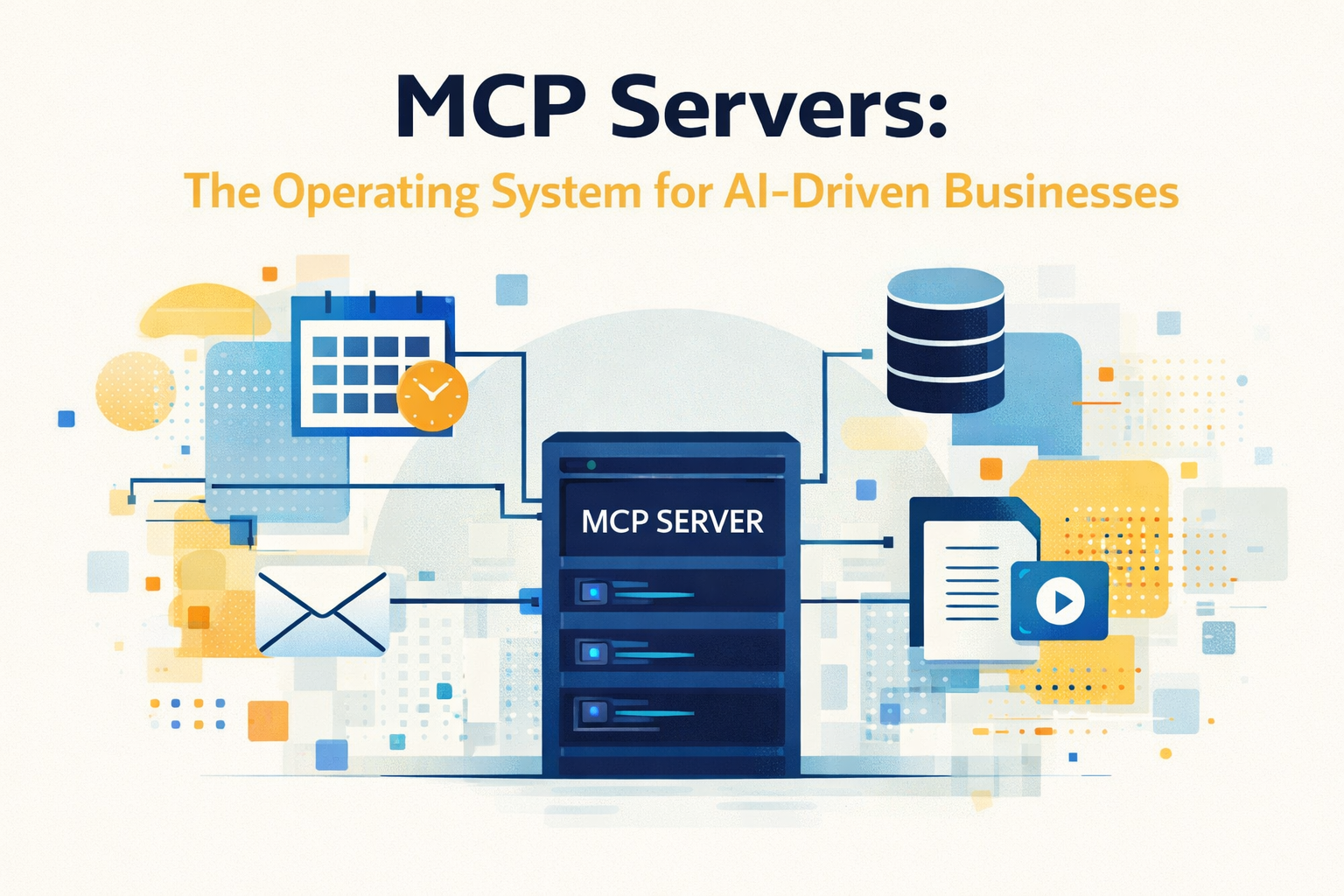
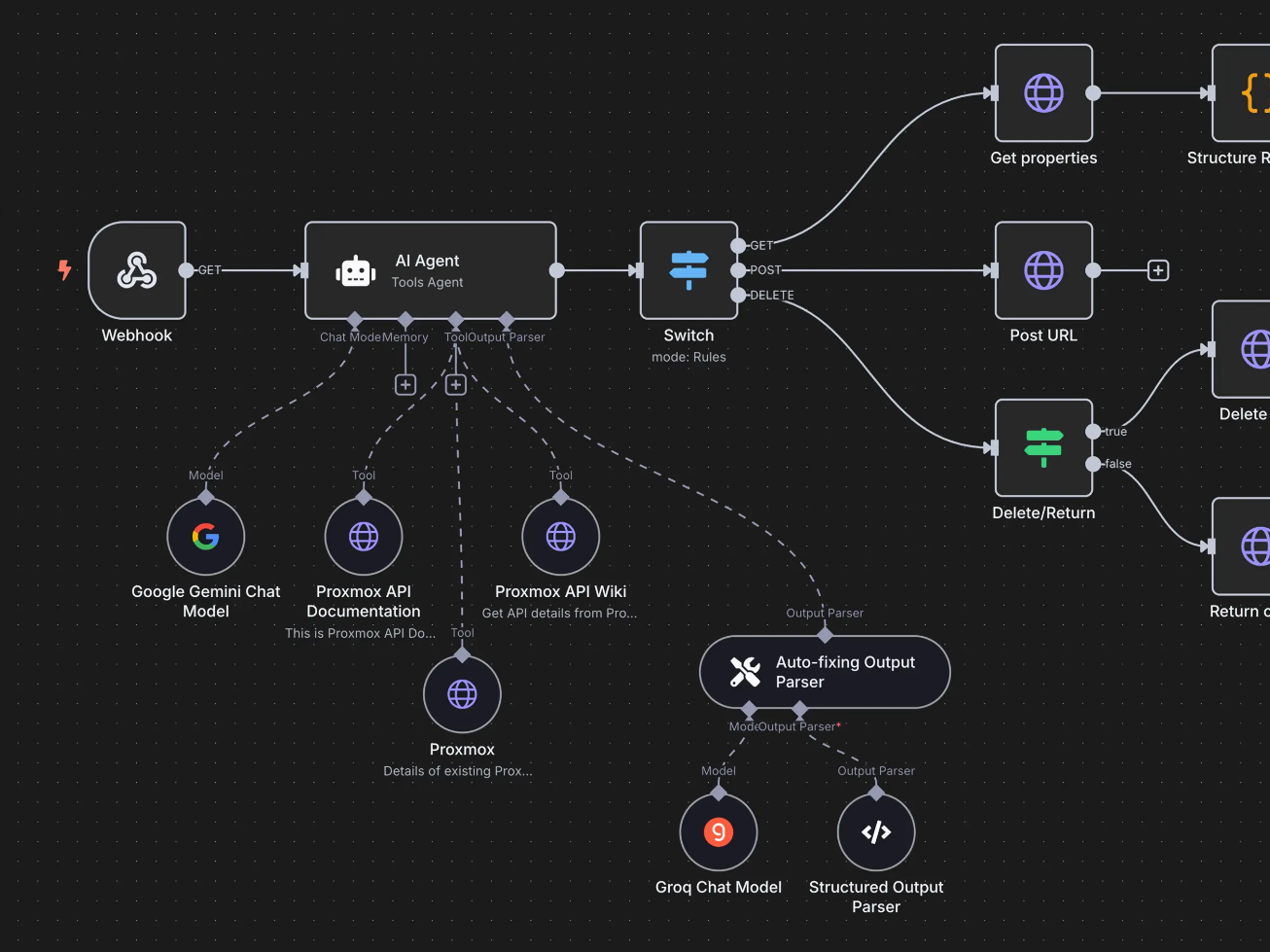
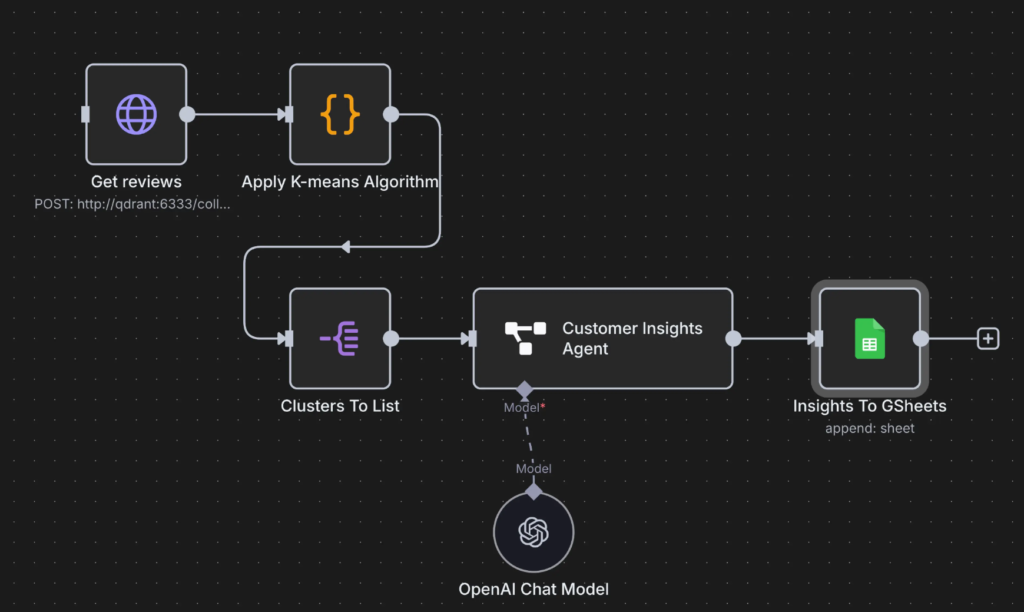
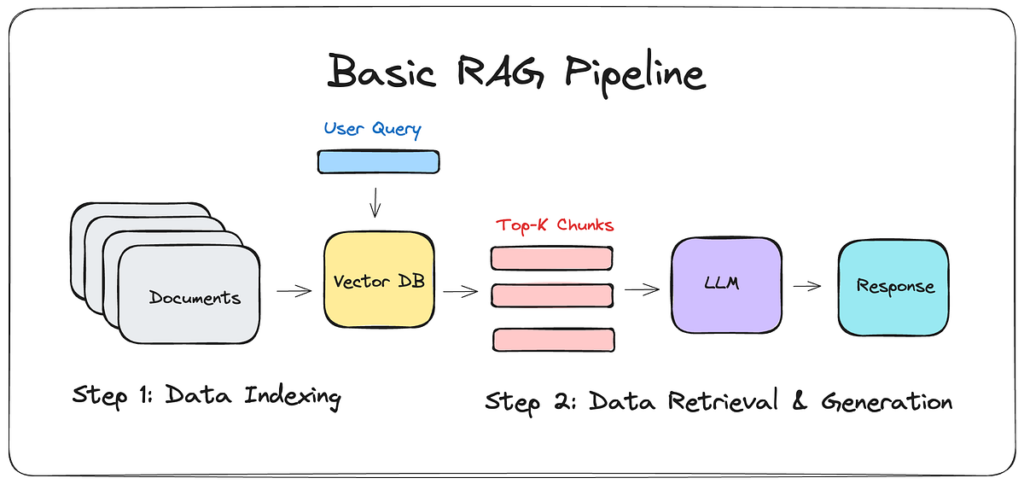
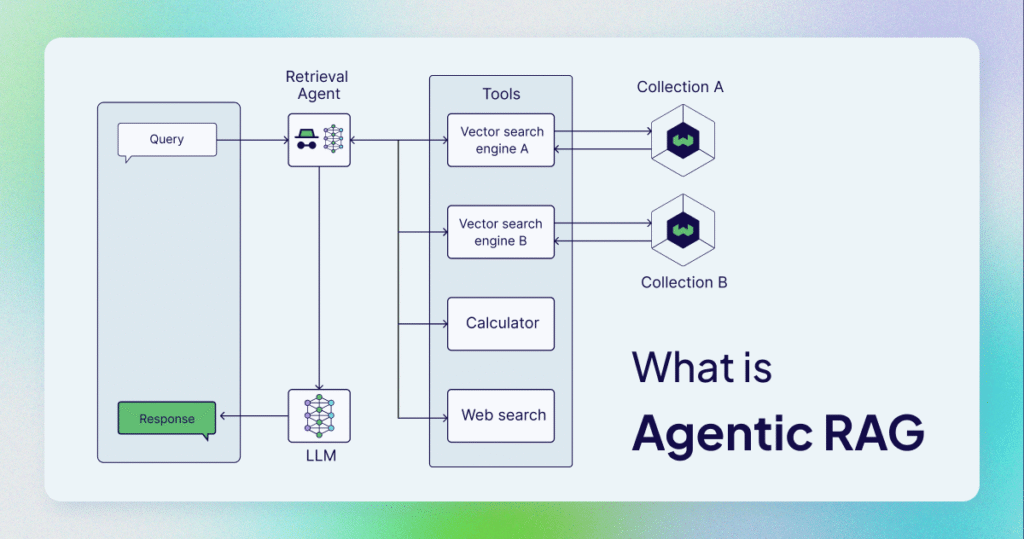
An MCP server usually refers to a server that implements the Model Context Protocol (MCP) — a standard designed to let AI models (like ChatGPT or other agents) connect to external tools, data, and services in a structured way.
🧠 Simple idea
Think of an MCP server as a bridge between an AI and the outside world.
Instead of hardcoding integrations, the AI can ask:
“Hey, what tools or data do you have?”
And the MCP server replies:
“I’ve got a database, a file system, and a calendar API — here’s how to use them.”
⚙️ What an MCP server does
An MCP server exposes capabilities to AI systems, typically:
1. Tools (Actions)
Functions the AI can call Examples:
Create a Notion page
Send an email
Query a database
Run a script
2. Resources (Data)
Structured data the AI can read Examples:
Files
Documents
Knowledge bases
APIs
3. Context
Extra information that helps the AI reason better Examples:
User preferences
Session state
Project data
🏗️ How it works (simplified flow)
AI connects to an MCP server
MCP server describes what it can do (schema)
AI decides what tool/resource to use
AI sends a request
MCP server executes and returns structured results
🧩 Why it matters
Without MCP:
Every integration is custom
Hard to scale
Hard to maintain
With MCP:
Standardized communication
Plug-and-play tools for AI agents
Easier to build AI-powered systems (like your n8n + Notion pipelines)
🔥 Real-world analogy (your style)
Think of MCP like:
A modular operating system for AI agents
Instead of building one giant tool…
You build small, reusable capabilities, and the AI orchestrates them.
🧠 In your world (Andrea-specific)
For what you’re building (AI + automation + creator systems), an MCP server could:
Expose your Notion database as structured knowledge
Let AI trigger your n8n workflows
Connect to YouTube transcripts pipeline
Manage lead data / CRM actions
👉 Basically: turn your whole backend into something AI can reason about and use
🧪 Example
Instead of coding:
send_email(to="client", body="...")
You expose a tool via MCP:
{
  "name": "send_email",
  "description": "Send an email to a contact",
  "parameters": { ... }
}
Now the AI decides when and why to use it.
🚀 One-liner
An MCP server is a standardized way to give AI agents access to tools, data, and workflows — so they can act, not just respond.
If you want, I can help you design a custom MCP architecture for your Creator OS / automation stack — that’s actually where this gets really powerful.
AI agents are quietly becoming the “always‑on growth team” inside modern marketing departments, and the marketers who learn to orchestrate them now will own the next decade.
This guide will show you how to turn AI agents from shiny toys into a predictable revenue engine in 2026.
Table of Contents
The Problem: Marketing Is Stuck In Manual Mode
Most marketing teams are drowning in tools but starving for outcomes. Campaigns still rely on manual handoffs, lagging reports, and guesswork instead of real‑time decisions.reddit+2
Key pain points AI agents expose:
Fragmented stacks: Data lives in CRM, ad platforms, analytics, and support tools that rarely talk to each other, killing cross‑channel optimization.
Slow reaction times: By the time your team notices ROAS has dropped, you’ve already wasted budget and lost conversions.
“Set and forget” campaigns: Launch once, tweak monthly; meanwhile, your competitors run thousands of micro‑experiments per week.
Over-reliance on content volume: Early generative AI led to more content, not better performance or relevance.
If you feel like you’re babysitting tools instead of scaling strategy, you’re not alone, over half of marketers report under‑utilizing their tech and struggling to prove ROI.
The stakes are rising fast. 2026 is being called “the year of Agentic Marketing” because brands are moving from using AI tools to governing autonomous AI systems that actually run core workflows.
What this means in practice:
Attention is compressing: AI search, GEO (Generative Engine Optimization), and chat assistants answer more queries without sending traffic to your site, so you get fewer chances to make a first impression.
Your competitors won’t wait: Multi‑agent systems already outperform single agents by ~90% on complex tasks and give 50% of adopters a clear competitive edge.
Inefficiency is now visible: 55% of marketers are unhappy with cost vs. value in their stack, and 99% underutilize their tools, creating budget pressure and skepticism about new investments.
Consumer expectations are spiking: Hyper-personalized “segment of one” experiences are now feasible at scale, which makes generic campaigns look lazy and off‑brand.
If you’re still treating AI as a copy assistant while others are letting agents reallocate spend, refine audiences, and adapt creative in real time, you’re effectively operating with a 12–24 month handicap.
The Solution: Agentic Marketing Systems, Not One‑Off Tools
The shift is from “Prompt Engineering” to “Agent Orchestration.” Instead of a marketer manually prompting a model all day, you design a network of AI agents with clear roles, objectives, and guardrails that collaborate across your stack.
What AI agents actually do for marketers in 2026
Autonomous optimization: Agents monitor ROAS, CPC, and LTV in real time, launch micro‑tests, and shift budget across channels without waiting for a weekly meeting.
Dynamic segmentation & personalization: Agents turn first‑party behavior, transactions, and context into “moments of need,” enabling true 1:1 experiences instead of static segments.
Campaign planning & forecasting: Agents synthesize CRM, web analytics, and market signals to propose media plans, predict performance, and surface creative ideas.
Cross‑channel orchestration: Agents fuse search, social, display, and CTV signals into a single decision layer, reducing channel cannibalization and improving incremental lift.
Customer & agent‑to‑agent interactions: Customer assistants negotiate with brand‑side agents on stock, delivery, returns, and offers, compressing multi‑minute flows into a single exchange.
Evidence is stacking up:
Organizations that integrated AI agents into their marketing saw roughly 23% higher lead conversion over 12 months, and some autonomous language optimization agents have delivered up to 450% lifts in CTR vs. human‑only copy.
Here are practical AI agents you can deploy today and what they handle.
Agent type
Core job
Example in action
Media Optimization Agent
Monitor & rebalance ad spend
Detects drop in ROAS on Meta, spins 10 new creatives, reallocates budget nightly.
Audience Discovery Agent
Find and refine high‑value segments
Scans behavior logs to reveal niche B2B clusters and trims overlap to cut self‑bidding.
Content & GEO Agent
Generate, test, and optimize content for AI discovery
Produces answer‑optimized content that LLMs can cite, tracks GEO vs. classic SEO.
Lifecycle Nurture Agent
Run personalized email/SMS/web journeys
Adapts messaging per individual micro‑intent instead of static drip sequences.
CX & Sales Assistant Agent
Handle conversations and qualify buyers
Manages complex pre‑sales questions, hands over warm, scored opportunities.
What The Data Says
Third‑party research and real‑world case studies show that AI agents are not just hype—they are a structural shift in how marketing work gets done.
Notable stats and trends:
Market growth: The global AI agent market was about 5.4B USD in 2024 and is projected to grow nearly tenfold to over 50B by 2030, driven by enterprise adoption.
Efficiency gains: Organizations using autonomous agents report 30–50% efficiency improvements, plus much shorter optimization cycles and better client satisfaction.
Conversion impact: Agent‑driven personalization and lead nurturing have delivered average conversion lifts of ~23% year‑over‑year.
Creative performance: In a financial services case, AI‑generated ad language outperformed human copy by up to 450% in CTR, leading to a multi‑year expansion deal.
Strategic adoption: Analyst firms highlight “role‑based” agents that can operate across multiple systems as the next big enterprise AI wave, reshaping business models and workflows.
For marketers, this is comparable to the shift from email blasts to marketing automation platforms—only faster, and with higher upside.
A Practical 90‑Day AI Agent Launch Plan
You don’t need a full AI lab to start. You need clarity, constraints, and a sequence. Here’s a practical rollout plan you can adapt.
Step 1 – Pick one high‑impact, narrow use case
Focus where data is rich and success is measurable:
Paid media efficiency (ROAS, CAC).
Lead nurturing drop‑off (MQL → SQL).
On‑site conversion (cart or form abandonment).
Define a single business objective (e.g., “Increase paid social ROAS by 20% in 90 days”) and a clear primary KPI.
Step 2 – Design the agent’s role and sandbox
Before you touch tech, design the “job description”:
Inputs: What data can it see? (ad metrics, CRM, product, content).
Actions: What can it change autonomously vs. only propose for approval?
Phase 2: Allow the agent to act autonomously within predefined bounds, with automated alerts when thresholds are hit.
Phase 3: Expand its remit across additional channels, segments, or lifecycle stages.
Many teams see meaningful gains just by letting agents continuously propose optimizations, even before full autonomy.
Step 5 – Measure outcomes, not activity
As outcome‑based pricing grows, your internal AI strategy should mirror that mindset.
Track:
Incremental revenue and LTV vs. control groups.
CAC/ROAS movement by channel and segment.
Time‑to‑insight (how fast you can detect and act on changes).
Net new experiments per month vs. purely human workflows.
Report agent performance in the same business language you use for human teams—pipeline, revenue, margin—to maintain executive buy‑in.
What Marketers Should Do This Quarter
Here are concrete moves you can make in the next 90 days to future‑proof your role and your results with AI agents 2026:
Reframe your job: Shift from “prompt engineer” to “agent architect,” responsible for objectives, guardrails, and governance—not manual execution.
Audit your stack for agent‑readiness: Identify where data is siloed, where APIs are missing, and which workflows are high‑volume but rules‑based.
Launch a pilot agent: Start with a single, clearly scoped agent (e.g., Paid Media Optimizer) tied to a quantifiable outcome.
Build GEO and answer optimization into content: Optimize to be the brand that AI engines choose and cite, not just the one that ranks in blue links.
Document an “Agentic Playbook”: Define roles, standards, escalation paths, and compliance requirements so you can scale from 1 agent to many without chaos.
If you start now, you can still be the marketer who designed the system—not the one trying to keep up with it.
Takeaways For Marketers
AI agents are moving from nice‑to‑have to core marketing infrastructure, delivering measurable gains in efficiency and conversion.
The winners will be those who master agent orchestration, data unification, and GEO—not just content prompts.
A focused 90‑day pilot around one agent and one metric is the fastest path to de‑risk and prove value.
If you’d like, I can help you design a concrete AI agent blueprint tailored to your current channels and team size.
What’s the single marketing area you most want an AI agent to improve first—paid media, lifecycle/email, or on‑site conversion?
I’m currently building an AI-powered CRM / growth system for a craft beverage brand.
Not a funnel. Not “more content.” Not ads.
A real system.
Because over the last few years I’ve noticed something that almost every small craft brand has in common:
They don’t actually own their audience.
And that’s a bigger problem than most founders realize.
Table of Contents
The illusion of growth
From the outside, many craft brands look alive and growing.
Nice bottles. Good design. Active Instagram. People engaging with posts. Maybe even a few events or collaborations.
But when you zoom in, you often find something fragile behind the surface.
No real CRM. No structured customer database. No segmentation. No consistent follow-up. No owned communication channel.
Just a collection of:
followers
occasional customers
WhatsApp chats
spreadsheets
and scattered conversations
Floating around.
That’s not an audience. That’s noise.
What I saw in our first conversation
During my first strategic call with the founder of this brand, something very normal happened.
Nothing dramatic. Just chaos.
A recent launch had created stress. Schedules were overlapping. Things were being handled manually. Decisions were happening in real time. Adjustments everywhere.
Completely understandable. Also completely unsustainable.
Because when everything depends on memory, chat threads, and urgency, growth becomes fragile.
And fragile systems break exactly when things start working.
Most small brands don’t have a marketing problem
They have an infrastructure problem.
They think they need:
more content
more ads
more visibility
more posts
But what they actually need is:
A system that captures, organizes, and nurtures attention.
If someone discovers your brand today, what happens next?
Do you know who they are? Can you contact them again? Can you tell them your story? Can you guide them toward a first purchase? Can you bring them back later?
For most craft brands, the honest answer is:
not really.
Followers are rented. Contacts are owned.
Social media creates visibility.
But visibility without capture is wasted attention.
If Instagram disappeared tomorrow:
how many of your followers could you reach?
how many customers could you contact?
how many distributors could you notify?
how many loyal buyers could you reactivate?
For most small brands, the number is close to zero.
That’s dangerous.
Because it means the brand exists only as long as platforms allow it to.
So we’re starting from zero (on purpose)
Before talking about ads, campaigns, or growth tactics, we’re building something much more fundamental.
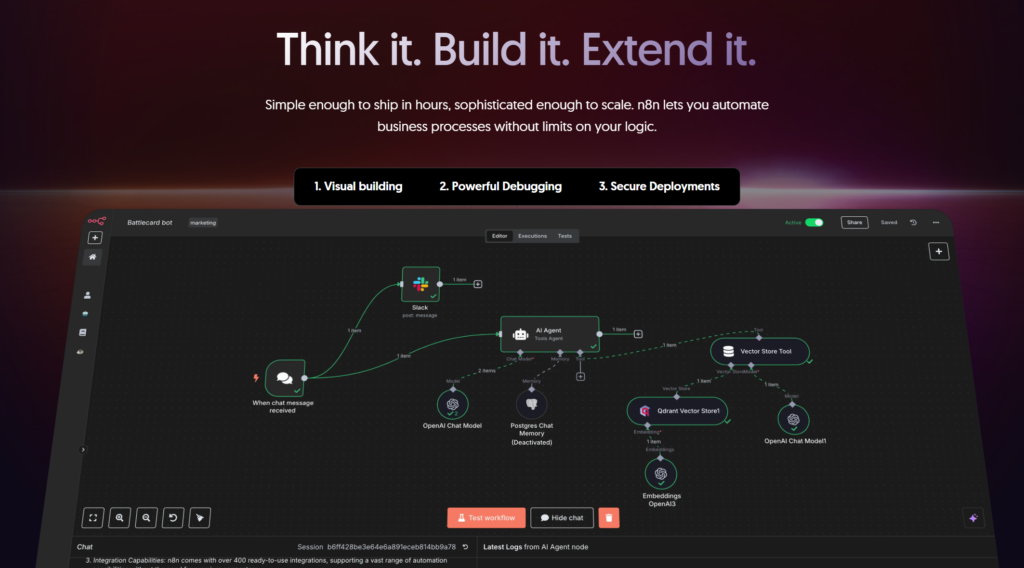
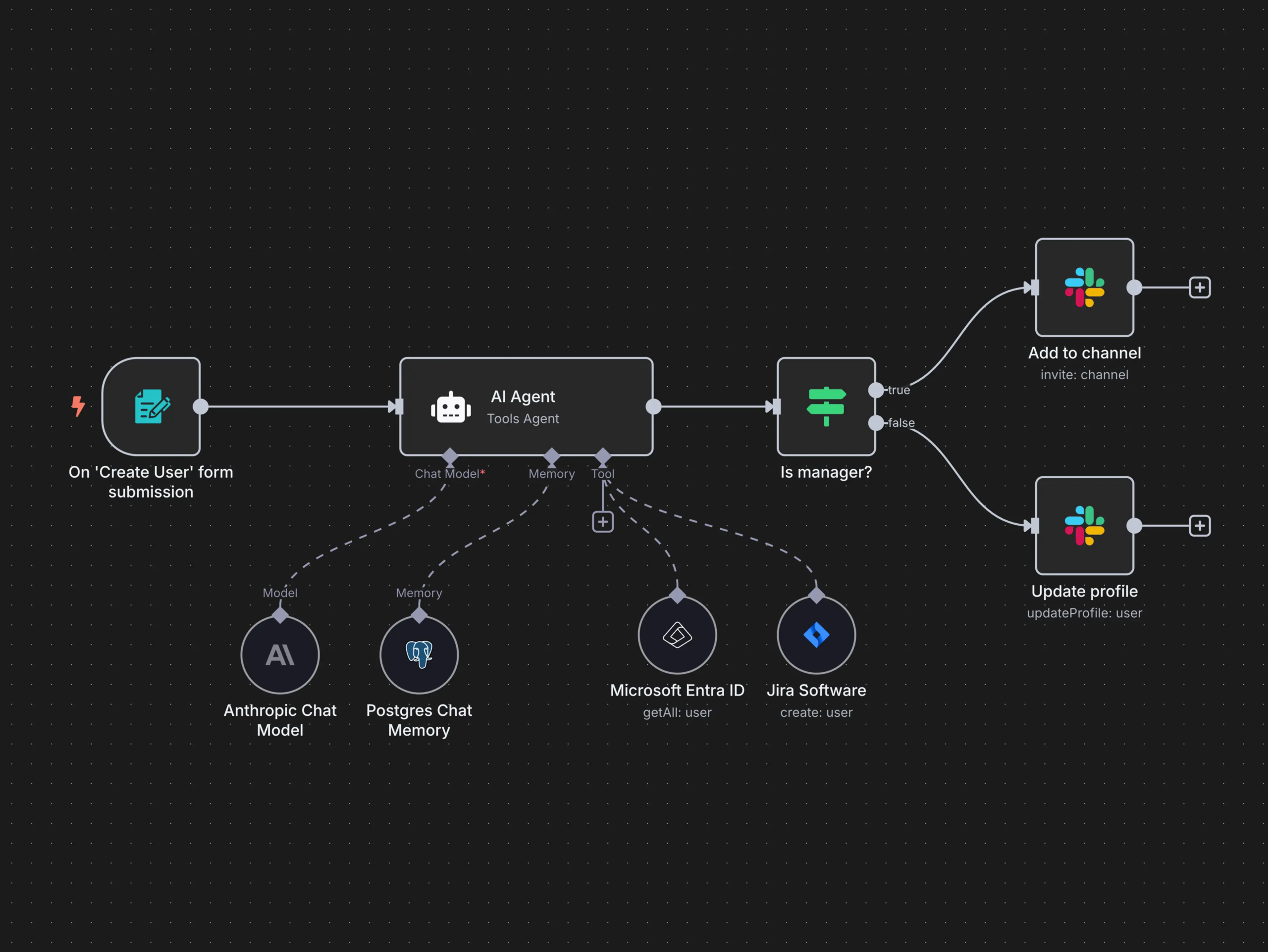
An n8n workflow is made of nodes connected by lines.
A typical flow looks like this:
Trigger Something starts the workflow (Webhook, form submission, new email, scheduled time, etc.)
Processing Data gets transformed, filtered, enriched, or analyzed (JavaScript, conditions, AI calls, formatting)
Actions Data is sent somewhere (Notion, Google Sheets, Slack, email tools, CRMs, APIs)
Each step passes structured data to the next one.
No magic. No black box.
Why n8n is different from other automation tools
If you’ve heard of Zapier or Make, n8n plays in the same space, but with very different philosophy.
1. You own the system
n8n can be self-hosted.
That means:
Your data stays with you
No per-task pricing anxiety
Full control over performance and scaling
For serious builders, this is huge.
2. Real logic, not toy automation
n8n supports:
IF / ELSE branches
Loops
Error handling
Custom JavaScript
API calls with full control
You’re not limited to “when X then Y”.
You can build actual systems.
3. AI-ready by design
n8n works extremely well with:
LLM APIs
AI transcription
Classification
Content generation
Agent-like workflows
This makes it perfect for AI-assisted businesses, not just task automation.
What can you do with n8n?
Here are practical, real-world use cases, not buzzwords.
1. Automate content pipelines
Example:
YouTube video → transcript
Transcript → AI summary
Summary → blog post
Blog post → newsletter
Newsletter → social snippets
Everything stored in Notion
One input.
Many outputs.
Zero repetition.
2. Build lead & client systems
Example:
Website form submission
Enrich lead data
Add to CRM
Send personalized email
Create follow-up tasks
Notify you on Slack
Your “sales brain” runs automatically.
3. Create AI-powered workflows
Example:
Receive raw text or voice note
Transcribe (AI)
Analyze intent
Categorize
Generate structured output
Save it in a database
Ask follow-up questions if unclear
This is where n8n starts feeling like an AI agent, not an automation tool.
4. Sync tools that don’t talk to each other
APIs, webhooks, databases, legacy tools.
n8n doesn’t care.
If it has an API (or even just HTTP access) you can integrate it.
n8n’s core capabilities (quick breakdown)
🔗 300+ integrations (and infinite via API)
🧠 Conditional logic & branching
🔁 Loops & batch processing
🧪 Custom JavaScript execution
🤖 AI & LLM integrations
🗄️ Database & Notion-style workflows
🖥️ Self-hosting & cloud options
🔐 Full data control & security
⚙️ Error handling & retries
In short: it scales with your brain.
Who is n8n for?
n8n is especially powerful if you are:
A creator building systems around content
A freelancer or consultant managing leads and clients
A solo founder who hates repetitive work
A technical-curious non-developer
Someone building AI-assisted workflows
If you like understanding how things work, n8n feels right.
Who n8n is NOT for (honestly)
People who want 1-click AI magic
Users who hate logic or structure
Teams that are not willing to systematize procedures
n8n rewards clarity and system thinking.
Final thought
n8n is not “another automation tool”.
It’s a system builder.
If you think in workflows, maps, and processes, n8n becomes an extension of your mind.
And once you automate the boring glue work, you finally get back what matters most:
Focus, leverage, and creative freedom.
Want to go deeper?
I regularly share practical breakdowns on n8n, automation systems, and AI agents, how they work, how to design them, and how to actually use them to save time and build leverage.
If you’re interested in thinking in systems and understanding these new tools, join the newsletter below 👇
This article explains what Retrieval-Augmented Generation (RAG) actually is, when it makes sense to use it, and when it might add unnecessary complexity.
Table of Contents
1. Why This Concept Exists (Problem First)
RAG did not emerge because language models weren’t smart enough. It emerged because knowledge and intelligence are two different things.
Modern LLMs are excellent at reasoning, synthesis, and language. What they are not good at is:
accessing private information
staying up to date
grounding answers in specific, verifiable sources
As AI systems started moving from demos to real products, this gap became impossible to ignore.
The Core Problem RAG Tries to Solve
Without RAG, AI systems are forced into a bad trade-off:
either answer confidently using incomplete knowledge
or refuse to answer when certainty matters
Neither option scales well in real-world applications.
This becomes a serious issue when:
information changes frequently
data is private or proprietary
correctness matters more than fluency
users expect answers grounded in their documents, not generic knowledge
What Breaks Without It
Without a retrieval layer:
models hallucinate when they lack context
long prompts become unmanageable
updating knowledge requires manual work or retraining
systems drift out of sync with reality
In short, intelligence becomes detached from information.
Why This Concept Emerged Now
RAG exists because three things happened at the same time:
LLMs became good enough at reasoning The bottleneck is no longer language or logic.
Context windows remained finite You still can’t load everything into a prompt.
AI moved into operational environments Where accuracy, trust, and traceability matter.
RAG is the architectural response to this shift — a way to reconnect intelligent models with real, changing knowledge.
Framing Statement
This concept exists because models can think, but they can’t remember everything.
Without it, systems struggle with accuracy, relevance, and trust at scale.
If you’ve ever wondered why an AI sounded smart but felt unreliable, this is the problem RAG was designed to address.
2. What Is RAG, Really?
RAG stands for Retrieval-Augmented Generation.
At its core, RAG is a way to make a language model stop answering purely from memory and instead look up relevant information first, then generate an answer based on that information.
Stripped of AI jargon, RAG is simply this:
An AI system that reads before it answers.
The core idea (plain English)
A standard LLM:
answers only using what it learned during training
has no access to your private documents or databases
may hallucinate when information is missing or unclear
A RAG system:
receives a question
retrieves relevant information from an external source
injects that information into the prompt
generates an answer grounded in that context
The model itself is not “smarter.” It just has access to the right information at the right time.
A useful mental model
Think of it this way:
LLM without RAG → a student answering from memory
LLM with RAG → a student allowed to consult notes before answering
The quality of the answer depends on:
the model’s reasoning ability
the quality and relevance of the retrieved information
What RAG is NOT
To avoid confusion, it’s important to be clear about what RAG is not:
❌ It is not fine-tuning
❌ It does not retrain the model
❌ It is not a guaranteed fix for hallucinations
❌ It is not always necessary
RAG does not change the model. It changes the context provided at inference time.
3. How RAG Works (Step by Step)
Let’s look at what actually happens under the hood, without unnecessary complexity.
Most real-world implementations fall into a small number of recurring patterns. Understanding them helps you choose the simplest architecture that solves your problem, instead of defaulting to complexity.
Contains information related to marketing campaigns of the user. These are shared with Google AdWords / Google Ads when the Google Ads and Google Analytics accounts are linked together.
90 days
__utma
ID used to identify users and sessions
2 years after last activity
__utmt
Used to monitor number of Google Analytics server requests
10 minutes
__utmb
Used to distinguish new sessions and visits. This cookie is set when the GA.js javascript library is loaded and there is no existing __utmb cookie. The cookie is updated every time data is sent to the Google Analytics server.
30 minutes after last activity
__utmc
Used only with old Urchin versions of Google Analytics and not with GA.js. Was used to distinguish between new sessions and visits at the end of a session.
End of session (browser)
__utmz
Contains information about the traffic source or campaign that directed user to the website. The cookie is set when the GA.js javascript is loaded and updated when data is sent to the Google Anaytics server
6 months after last activity
__utmv
Contains custom information set by the web developer via the _setCustomVar method in Google Analytics. This cookie is updated every time new data is sent to the Google Analytics server.
2 years after last activity
__utmx
Used to determine whether a user is included in an A / B or Multivariate test.
18 months
_ga
ID used to identify users
2 years
_gali
Used by Google Analytics to determine which links on a page are being clicked
30 seconds
_ga_
ID used to identify users
2 years
_gid
ID used to identify users for 24 hours after last activity
24 hours
_gat
Used to monitor number of Google Analytics server requests when using Google Tag Manager