Author: Andrea Tarroni

  • 🔥 What Is n8n? (the Future of Automation)

    🔥 What Is n8n? (the Future of Automation)

    A clear, no-fluff guide to what it is, why it matters, and what you can actually do with it.


    The real problem n8n solves

    Most creators, freelancers, and small teams end up trapped in manual glue work.

    • You copy data from one tool to another.
    • You download files, re-upload them somewhere else.
    • You trigger emails by hand.
    • You repeat the same boring steps every single week.

    The result?
    You spend more time managing systems than doing meaningful work.

    This is exactly where n8n comes in.


    What is n8n?

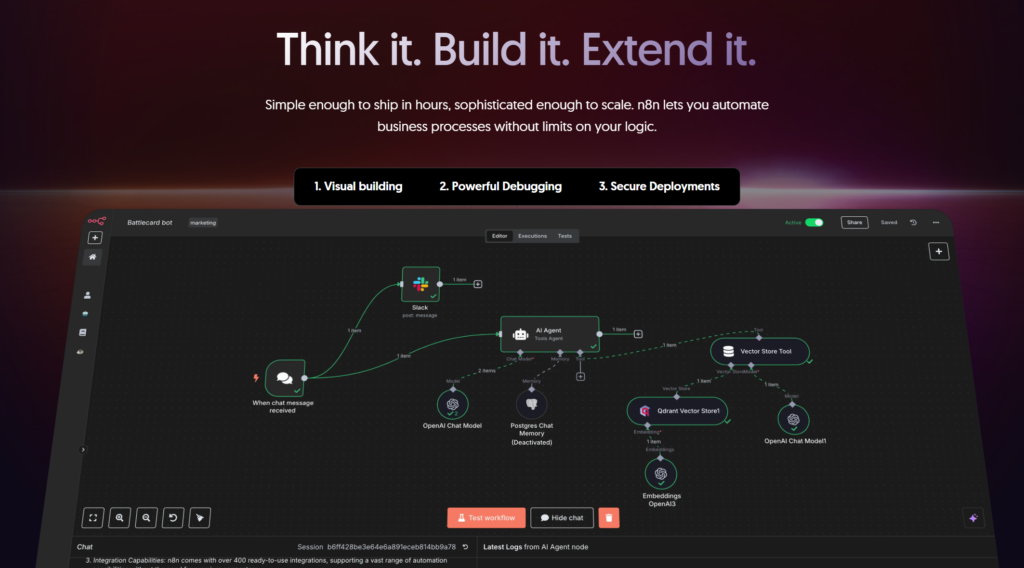
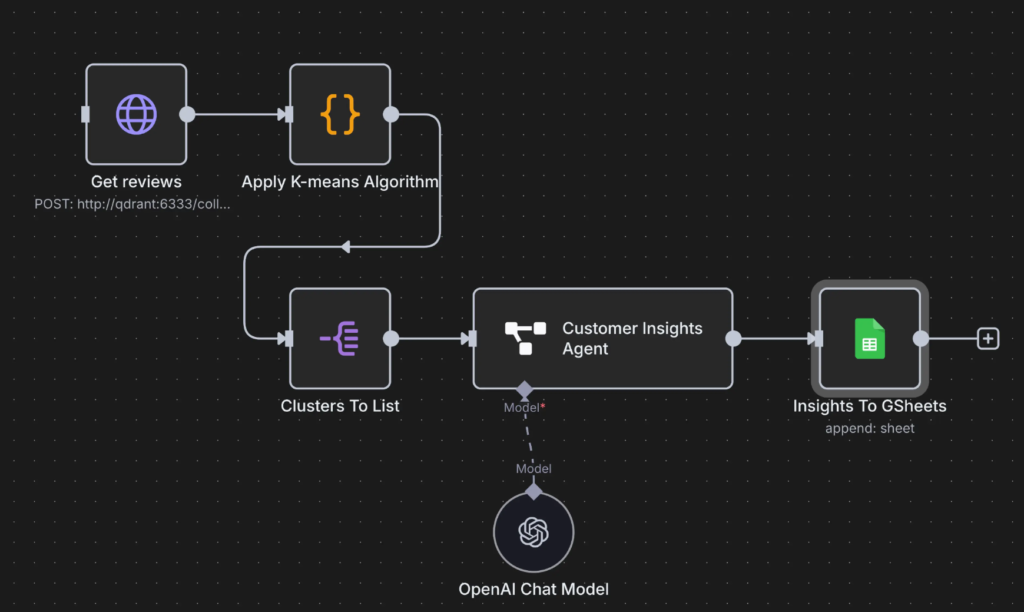
    n8n (pronounced “n-eight-n”) is a workflow automation tool that lets you connect apps, services, and logic together using a visual, node-based editor.

    Think of it as:

    A programmable nervous system for your digital business.

    Instead of writing scripts from scratch or relying on rigid no-code tools, you design workflows by visually connecting nodes:

    • Triggers (something happens)
    • Actions (do something)
    • Logic (if / else, loops, filters)
    • AI & data processing (LLM Agents)

    All without losing control.

    You can try n8n here for free, for 14 days.


    How n8n actually works (in simple terms)

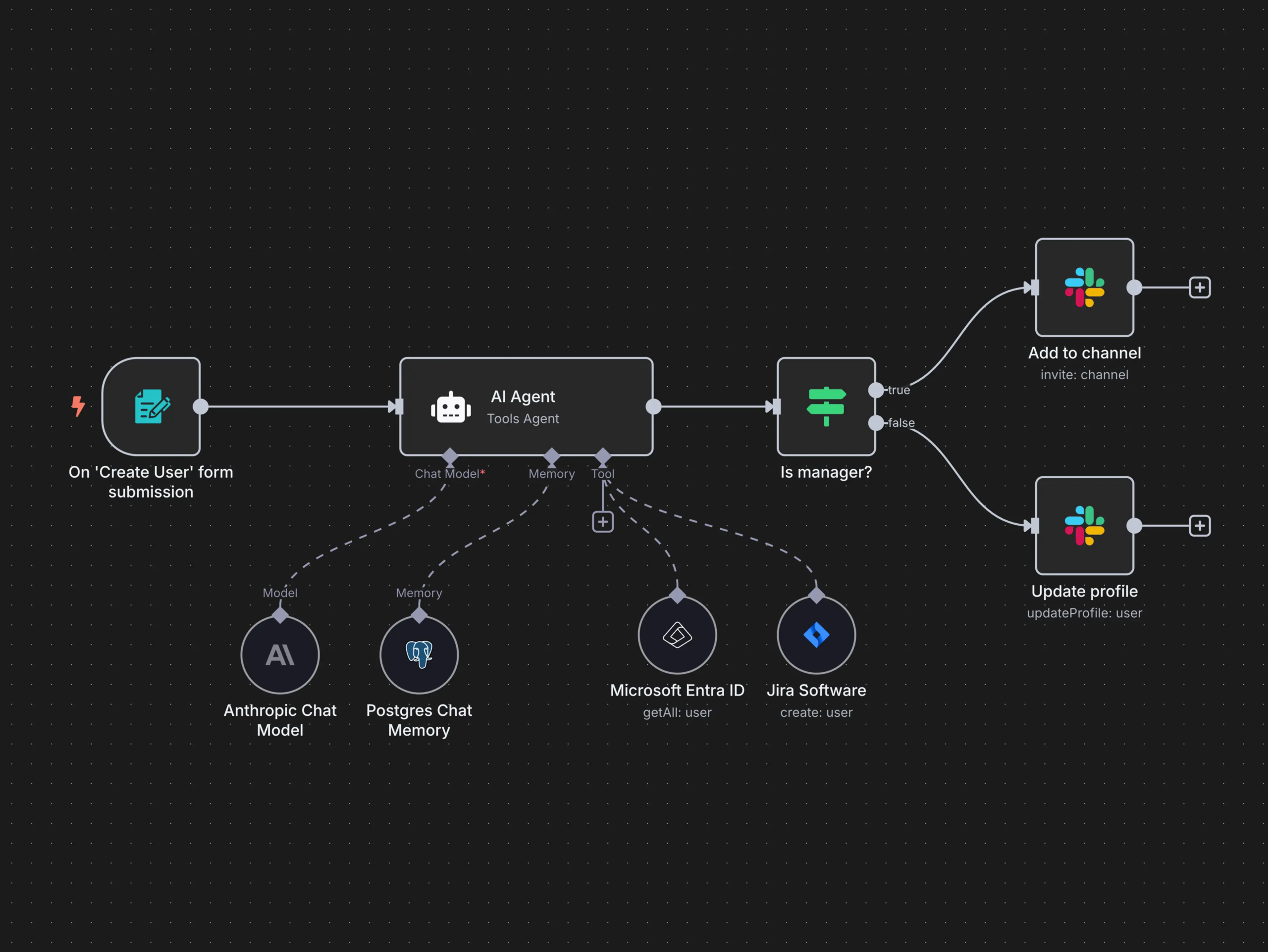
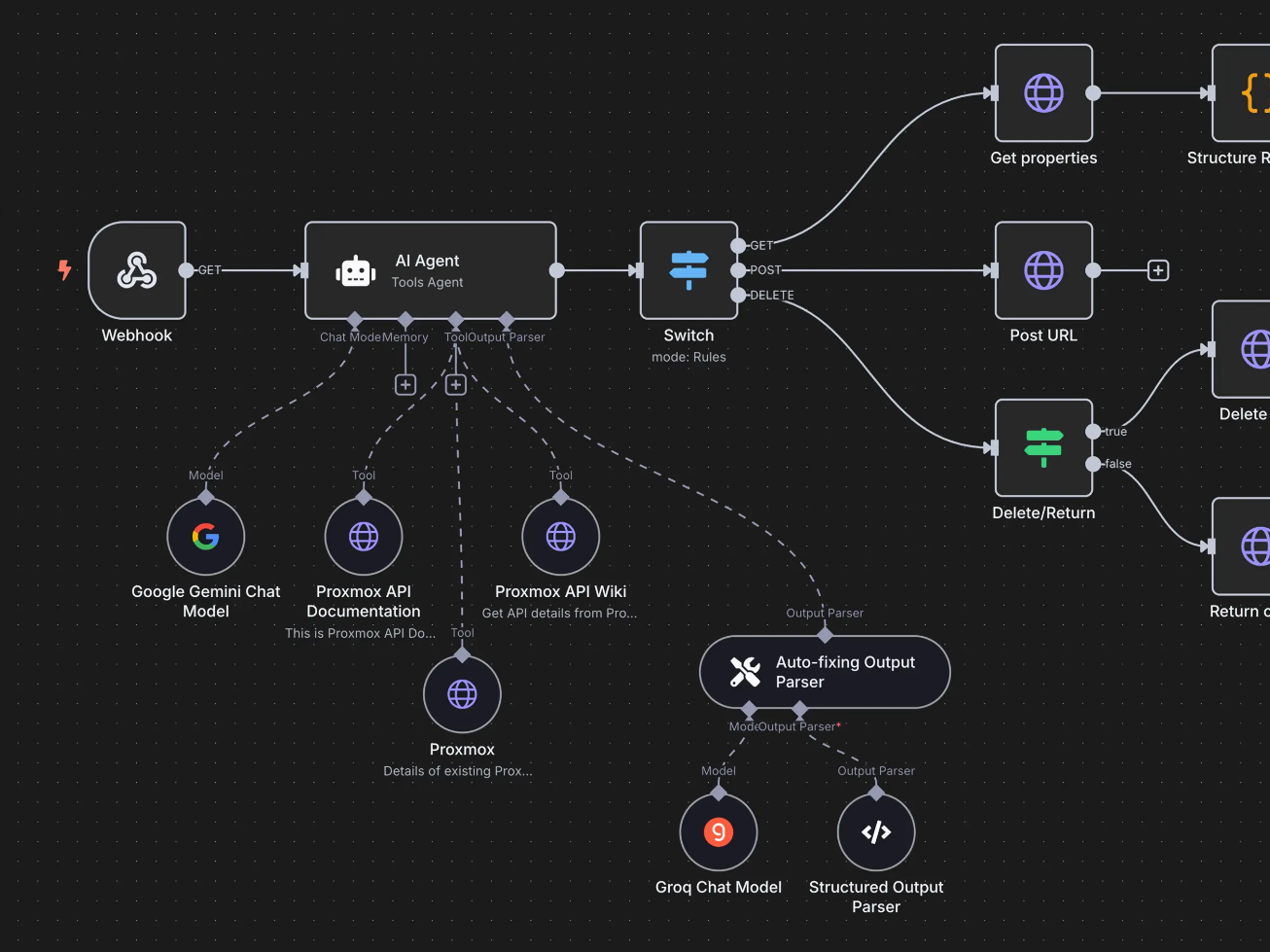
    An n8n workflow is made of nodes connected by lines.

    A typical flow looks like this:

    1. Trigger
      Something starts the workflow
      (Webhook, form submission, new email, scheduled time, etc.)
    2. Processing
      Data gets transformed, filtered, enriched, or analyzed
      (JavaScript, conditions, AI calls, formatting)
    3. Actions
      Data is sent somewhere
      (Notion, Google Sheets, Slack, email tools, CRMs, APIs)

    Each step passes structured data to the next one.

    No magic.
    No black box.


    Why n8n is different from other automation tools

    If you’ve heard of Zapier or Make, n8n plays in the same space, but with very different philosophy.

    1. You own the system

    n8n can be self-hosted.

    That means:

    • Your data stays with you
    • No per-task pricing anxiety
    • Full control over performance and scaling

    For serious builders, this is huge.


    2. Real logic, not toy automation

    n8n supports:

    • IF / ELSE branches
    • Loops
    • Error handling
    • Custom JavaScript
    • API calls with full control

    You’re not limited to “when X then Y”.

    You can build actual systems.


    3. AI-ready by design

    n8n works extremely well with:

    • LLM APIs
    • AI transcription
    • Classification
    • Content generation
    • Agent-like workflows

    This makes it perfect for AI-assisted businesses, not just task automation.


    What can you do with n8n?

    Here are practical, real-world use cases, not buzzwords.


    1. Automate content pipelines

    Example:

    • YouTube video → transcript
    • Transcript → AI summary
    • Summary → blog post
    • Blog post → newsletter
    • Newsletter → social snippets
    • Everything stored in Notion

    One input.

    Many outputs.

    Zero repetition.


    2. Build lead & client systems

    Example:

    • Website form submission
    • Enrich lead data
    • Add to CRM
    • Send personalized email
    • Create follow-up tasks
    • Notify you on Slack

    Your “sales brain” runs automatically.


    3. Create AI-powered workflows

    Example:

    • Receive raw text or voice note
    • Transcribe (AI)
    • Analyze intent
    • Categorize
    • Generate structured output
    • Save it in a database
    • Ask follow-up questions if unclear

    This is where n8n starts feeling like an AI agent, not an automation tool.


    4. Sync tools that don’t talk to each other

    APIs, webhooks, databases, legacy tools.

    n8n doesn’t care.

    If it has an API (or even just HTTP access) you can integrate it.


    n8n’s core capabilities (quick breakdown)

    🔗 300+ integrations (and infinite via API)

    🧠 Conditional logic & branching

    🔁 Loops & batch processing

    🧪 Custom JavaScript execution

    🤖 AI & LLM integrations

    🗄️ Database & Notion-style workflows

    🖥️ Self-hosting & cloud options

    🔐 Full data control & security

    ⚙️ Error handling & retries

    In short: it scales with your brain.


    Who is n8n for?

    n8n is especially powerful if you are:

    • A creator building systems around content
    • A freelancer or consultant managing leads and clients
    • A solo founder who hates repetitive work
    • A technical-curious non-developer
    • Someone building AI-assisted workflows

    If you like understanding how things work, n8n feels right.


    Who n8n is NOT for (honestly)

    • People who want 1-click AI magic
    • Users who hate logic or structure
    • Teams that are not willing to systematize procedures

    n8n rewards clarity and system thinking.


    Final thought

    n8n is not “another automation tool”.

    It’s a system builder.

    If you think in workflows, maps, and processes, n8n becomes an extension of your mind.

    And once you automate the boring glue work, you finally get back what matters most:

    Focus, leverage, and creative freedom.


    Want to go deeper?


    I regularly share practical breakdowns on n8n, automation systems, and AI agents, how they work, how to design them, and how to actually use them to save time and build leverage.

    If you’re interested in thinking in systems and understanding these new tools, join the newsletter below 👇

  • 🧠 WARM OUTREACH CRM

    🧠 WARM OUTREACH CRM

    Most AI consultants don’t struggle with tools.
    They struggle with conversations.

    You meet interesting people. You have good calls. You exchange ideas in DMs.


    Then… everything lives in your head, in random notes, or gets lost completely.

    Traditional CRMs don’t help here.


    They’re built for deals, pipelines, and pressure — not for warm outreach, curiosity, or relationship-led growth.

    This framework was built for a different phase.

    It’s a minimal Notion database designed for:

    • AI consultants
    • Automation Builders
    • Solo operators

    …who are exploring positioning, testing use cases, and building momentum without becoming an agency or a salesperson.

    This is not about closing faster.


    It’s about seeing patterns, nurturing the right conversations, and letting referrals emerge naturally.

    Below, I’ll show you the exact structure I use to manage warm outreach, and how to use it as a research lab for your future offers.


    A Minimal Notion System for AI Consultants

    Purpose
    Track human conversations, not deals.
    Designed for warm outreach, referrals, and relationship-led growth.


    🗂️ DATABASE CORE

    Database name: Warm Outreach

    Philosophy:
    Curiosity → Resonance → Small Experiments
    (Not sales funnels.)


    🧩 ESSENTIAL PROPERTIES

    🔹 Name

    Type: Title
    Person or brand name.


    🔹 Relationship Type

    Type: Select

    • Creator friend / peer
    • Student
    • Course creator / coach
    • Founder / entrepreneur
    • Agency owner
    • Audience contact

    🔹 Warmth Level

    Type: Select

    • Strong
    • Warm
    • Lukewarm
    • Cold-ish

    Controls tone & timing.


    🔹 Primary Use Case Angle

    Type: Multi-select

    • Content Repurposing
    • Lead Capture & Nurture
    • Personal Brand AI
    • Client Onboarding Automation
    • Creator Operating System

    Tracks what resonates, not what you pitch.


    🔹 Observed Pain / Signal

    Type: Text
    What problem they already feel.


    🔹 Current Status

    Type: Select (ordered)

    1. Not contacted
    2. Light conversation
    3. Active conversation
    4. Problem acknowledged
    5. Exploring solution
    6. Test project proposed
    7. Test project running
    8. Paused / Not now
    9. Closed

    Conversation-based pipeline.


    🔹 Outreach Angle

    Type: Text
    The one-liner you’d actually say.


    🔹 Last Touch

    Type: Date
    Last interaction.


    🔹 Next Action

    Type: Text
    Single concrete step.


    🔹 Follow-up Date

    Type: Date
    Turns the DB into a reminder system.


    🔹 Notes / Context

    Type: Text
    Human context, preferences, history.


    🔁 REFERRAL MECHANIC (BUILT-IN)

    🔹 Referral Source

    Type: Relation → same database
    Who introduced this person.


    🔹 Referred By (Text)

    For external or indirect intros.


    🔹 Referral Potential

    Type: Select

    • High (connector)
    • Medium
    • Low
    • Unknown

    Identifies network hubs.


    🧱 CORE VIEWS

    🧩 Pipeline (Kanban)

    • View: Board
    • Group by: Current Status
      Visual conversation flow.

    📅 Follow-ups (Calendar)

    • View: Calendar
    • Date: Follow-up Date
      Never drop warm conversations.

    🔄 OPERATING LOOP

    Weekly (30 min):

    1. Review Pipeline
    2. Pick 3 warm contacts
    3. Send value-first message
    4. Update Status + Next Action

    Daily (5 min):

    • Check Follow-ups
    • Send light nudge

    🧭 KEY RULES

    • Move cards only when they move
    • No pitching before “Problem acknowledged”
    • Referrals happen after value, never before
    • This is a research lab, not a CRM

    🎯 OUTCOME

    • Cleaner conversations
    • More natural referrals
    • Clear signal on what to productize
    • No burnout, no pushy selling

    This system won’t magically get you clients.

    What it will do is something more valuable early on:

    • bring clarity to your conversations
    • surface what people actually care about
    • reveal which use cases spread naturally
    • and help you grow through relationships, not pressure

    If you use it consistently, you’ll start noticing something interesting:


    Your best opportunities won’t come from cold outreach or funnels, they’ll come from context, trust, and timing.

    That’s the real leverage.

    Use it as a foundation.

    Evolve it as your positioning sharpens.

    Want more systems like this?

    I share practical frameworks on AI, personal branding, and client acquisition for solo consultants and creators.

    Join the newsletter below.

  • 🤖 Why Everyone Talks About RAG (and Why Most People Misunderstand It)

    🤖 Why Everyone Talks About RAG (and Why Most People Misunderstand It)

    This article explains what Retrieval-Augmented Generation (RAG) actually is, when it makes sense to use it, and when it might add unnecessary complexity.


    1. Why This Concept Exists (Problem First)

    RAG did not emerge because language models weren’t smart enough.
    It emerged because knowledge and intelligence are two different things.

    Modern LLMs are excellent at reasoning, synthesis, and language.
    What they are not good at is:

    • accessing private information
    • staying up to date
    • grounding answers in specific, verifiable sources

    As AI systems started moving from demos to real products, this gap became impossible to ignore.


    The Core Problem RAG Tries to Solve

    Without RAG, AI systems are forced into a bad trade-off:

    • either answer confidently using incomplete knowledge
    • or refuse to answer when certainty matters

    Neither option scales well in real-world applications.

    This becomes a serious issue when:

    • information changes frequently
    • data is private or proprietary
    • correctness matters more than fluency
    • users expect answers grounded in their documents, not generic knowledge

    What Breaks Without It

    Without a retrieval layer:

    • models hallucinate when they lack context
    • long prompts become unmanageable
    • updating knowledge requires manual work or retraining
    • systems drift out of sync with reality

    In short, intelligence becomes detached from information.


    Why This Concept Emerged Now

    RAG exists because three things happened at the same time:

    1. LLMs became good enough at reasoning
      The bottleneck is no longer language or logic.
    2. Context windows remained finite
      You still can’t load everything into a prompt.
    3. AI moved into operational environments
      Where accuracy, trust, and traceability matter.

    RAG is the architectural response to this shift —
    a way to reconnect intelligent models with real, changing knowledge.


    Framing Statement

    This concept exists because models can think, but they can’t remember everything.

    Without it, systems struggle with accuracy, relevance, and trust at scale.

    If you’ve ever wondered why an AI sounded smart but felt unreliable, this is the problem RAG was designed to address.


    2. What Is RAG, Really?

    RAG stands for Retrieval-Augmented Generation.

    At its core, RAG is a way to make a language model stop answering purely from memory and instead look up relevant information first, then generate an answer based on that information.

    Stripped of AI jargon, RAG is simply this:

    An AI system that reads before it answers.

    The core idea (plain English)

    A standard LLM:

    • answers only using what it learned during training
    • has no access to your private documents or databases
    • may hallucinate when information is missing or unclear

    A RAG system:

    1. receives a question
    2. retrieves relevant information from an external source
    3. injects that information into the prompt
    4. generates an answer grounded in that context

    The model itself is not “smarter.”
    It just has access to the right information at the right time.


    A useful mental model

    Think of it this way:

    • LLM without RAG → a student answering from memory
    • LLM with RAG → a student allowed to consult notes before answering

    The quality of the answer depends on:

    • the model’s reasoning ability
    • the quality and relevance of the retrieved information

    What RAG is NOT

    To avoid confusion, it’s important to be clear about what RAG is not:

    • ❌ It is not fine-tuning
    • ❌ It does not retrain the model
    • ❌ It is not a guaranteed fix for hallucinations
    • ❌ It is not always necessary

    RAG does not change the model.
    It changes the context provided at inference time.


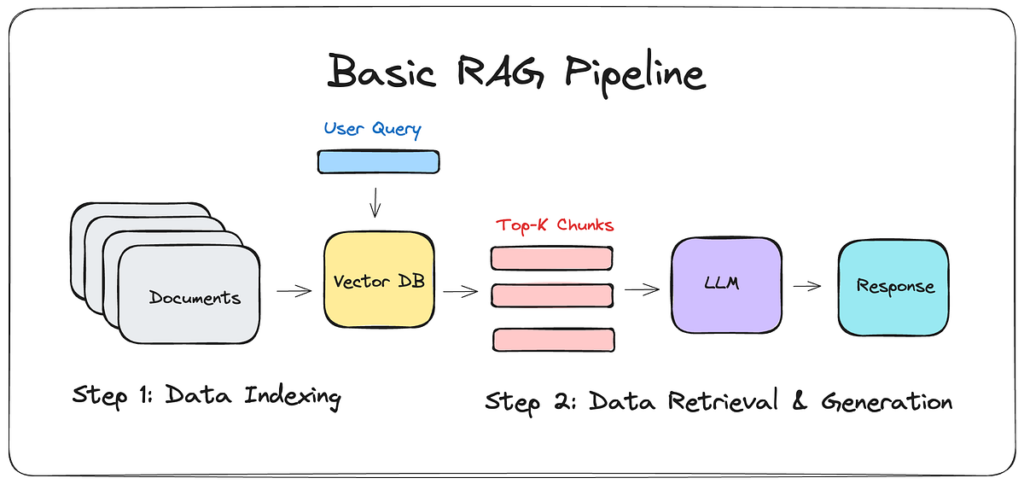
    3. How RAG Works (Step by Step)

    Let’s look at what actually happens under the hood, without unnecessary complexity.

    Image Credits: Link

    Step 0 — You Have a Knowledge Source

    Everything starts with a data source:

    • documents
    • PDFs
    • Notion pages
    • internal wikis
    • databases
    • transcripts
    • code repositories

    If there is no meaningful knowledge to retrieve, RAG provides no value.


    Step 1 — Chunking (Splitting the Data)

    The source content is split into chunks:

    • small blocks of text
    • typically 300–1,000 tokens each

    Why chunking matters:

    • retrieval works better on smaller units
    • context must remain focused and relevant

    Poor chunking leads to poor retrieval, which leads to poor answers.


    Step 2 — Embeddings (Turning Text into Vectors)

    Each chunk is converted into an embedding:

    • a numerical representation of semantic meaning
    • not words, but concepts and relationships

    Embeddings allow the system to:

    • compare meanings
    • find text that is conceptually similar to a query

    Step 3 — Vector Database (External Memory)

    The embeddings are stored in a vector database.

    This is the system’s external memory:

    • it does not store answers
    • it stores searchable meaning

    Retrieval happens here.


    Step 4 — Retrieval (Search by Meaning)

    When a user asks a question:

    1. the question is converted into an embedding
    2. the system searches for the closest semantic matches
    3. the top relevant chunks are retrieved

    This is not keyword search.
    It is intent- and meaning-based search.


    Step 5 — Augmentation (Context Injection)

    The retrieved chunks are injected into the prompt.

    Effectively, the model is told:

    “Answer the question using this information.”

    This is where hallucinations are reduced—not eliminated, but constrained.


    Step 6 — Generation (The Model Responds)

    Only now does the LLM generate the final response:

    • reading the question
    • using the injected context
    • producing the answer

    The model does not know where the data came from.
    It treats the retrieved text as part of the prompt.


    Where Complexity and Cost Enter

    Each step introduces:

    • additional costs (embeddings, storage, tokens)
    • latency (retrieval + generation)
    • new failure points

    This is why RAG is powerful—but not free and not always worth it.


    Key Takeaway

    RAG does not make AI more intelligent.
    It makes AI better informed at the moment of answering.

    That distinction is critical when deciding whether RAG is the right tool—or unnecessary complexity.


    4. When You Should Use RAG

    RAG is not a default architecture.
    It’s a problem-driven solution.

    You should consider RAG only if at least one of the following is true.


    1. You Need Access to Information the Model Was Not Trained On

    This is the most common and legitimate use case.

    Examples:

    • internal documentation
    • private knowledge bases
    • client-specific data
    • company policies
    • proprietary research
    • personal notes or archives

    If the information:

    • is not public
    • or changes frequently

    RAG is often the right choice.


    2. Your Knowledge Changes Over Time

    LLMs are static at inference time.
    Your data is not.

    Use RAG if:

    • content is updated regularly
    • accuracy depends on freshness
    • retraining or fine-tuning would be overkill

    RAG allows you to:

    • update information instantly
    • without touching the model

    3. You Need Traceability or Source Grounding

    In many professional contexts, confidence is not enough.

    RAG is useful when:

    • answers must be grounded in real documents
    • users need to verify sources
    • mistakes have real costs

    Typical scenarios:

    • legal
    • finance
    • internal operations
    • enterprise support

    4. Your Content Is Too Large for a Prompt

    Even with long-context models, limits exist.

    Use RAG if:

    • your corpus is larger than practical context windows
    • you need selective access, not full ingestion
    • relevance matters more than completeness

    RAG retrieves only what matters for each question.


    5. You Are Building Knowledge-Driven Tools

    RAG shines in:

    • internal assistants
    • documentation search
    • customer support bots
    • research tools
    • automation workflows tied to data

    If the value of the tool comes from what it knows, not just how it reasons, RAG is a strong candidate.


    A Simple Decision Heuristic

    You likely need RAG if:

    • the answer depends on your data
    • the data is large or dynamic
    • correctness matters more than creativity

    5. When You Should NOT Use RAG

    This is where most people get it wrong.

    Many RAG systems exist only because someone thought RAG was “the advanced way”.


    1. When Prompting Is Enough

    If your task:

    • is conceptual
    • relies on reasoning, synthesis, or creativity
    • does not require external knowledge

    RAG adds zero value.

    Examples:

    • ideation
    • writing
    • summarizing known concepts
    • strategy thinking
    • brainstorming

    A good prompt beats a bad RAG system every time.


    2. When You Have Very Little Data

    RAG does not create knowledge.
    It only retrieves what exists.

    If your dataset is:

    • small
    • shallow
    • poorly structured

    RAG will:

    • increase complexity
    • without improving results

    In these cases, direct context injection or manual prompts are simpler and better.


    3. When You Actually Need Fine-Tuning

    RAG is about knowledge access, not behavior change.

    If your goal is:

    • consistent tone
    • specific output formats
    • domain-specific reasoning patterns

    Fine-tuning (or instruction design) is often more appropriate.

    Using RAG here is solving the wrong problem.


    4. When Latency and Cost Matter More Than Accuracy

    RAG introduces:

    • extra API calls
    • retrieval latency
    • higher token usage
    • storage and embedding costs

    If your use case requires:

    • real-time responses
    • ultra-low latency
    • minimal infrastructure

    RAG may be the wrong trade-off.


    5. When You’re Doing It “Because Everyone Else Is”

    This is the most dangerous reason.

    If the justification for RAG is:

    • “best practice”
    • “future-proofing”
    • “this is how AI apps are built now”

    That’s a red flag.

    Architecture should follow constraints, not trends.


    The Overengineering Trap

    RAG often becomes:

    • harder to debug
    • harder to evaluate
    • harder to maintain

    A fragile RAG system is worse than:

    • a simple prompt
    • a curated document
    • a manual process

    Key Takeaway

    RAG is not a feature.
    It’s an architectural decision.

    Use it when:

    • knowledge access is the bottleneck

    Avoid it when:

    • reasoning, creativity, or simplicity matter more

    6. Tokenomics & Cost Dynamics of RAG

    RAG is often presented as a capability upgrade.
    In reality, it is a cost and complexity multiplier.

    Understanding where the costs come from — and how they compound — is essential before deciding to use it.


    The Core Principle

    A non-RAG system pays once per request.
    A RAG system pays multiple times per request, often in different ways.

    RAG does not just increase token usage — it introduces new cost surfaces.


    Where RAG Costs Actually Come From

    Let’s break it down.


    1. Embedding Costs (One-Time, but Scalable)

    Before retrieval can happen, your data must be embedded.

    Costs depend on:

    • number of documents
    • chunk size
    • embedding model used

    Key characteristics:

    • usually a one-time ingestion cost
    • increases every time you update or add data
    • scales linearly with corpus size

    Hidden issue:

    • bad chunking = more chunks = higher costs forever

    2. Storage Costs (Often Ignored)

    Embeddings must live somewhere:

    • vector databases
    • hosted services
    • managed infrastructure

    Costs depend on:

    • number of vectors
    • dimensionality
    • retention policies

    Individually small, but persistent.


    3. Retrieval Costs (Per Query)

    Every RAG query triggers:

    • a vector search
    • similarity computation
    • optional reranking

    This introduces:

    • latency
    • infrastructure cost
    • scaling considerations

    Even if tokens were free, retrieval is not.


    4. Prompt Inflation (The Silent Token Killer)

    This is where most people lose control.

    In RAG:

    • retrieved chunks are injected into the prompt
    • often hundreds or thousands of tokens
    • multiplied by every user request

    This means:

    • higher input token usage
    • larger prompts
    • higher per-request cost

    Many RAG systems spend more tokens on context than on answers.


    5. Generation Costs (Still Apply)

    On top of everything else:

    • the LLM still generates output
    • longer context often means higher reasoning cost
    • retries increase usage further

    RAG does not replace generation cost — it stacks on top of it.


    Why RAG Is Usually More Expensive Than Expected

    Most cost estimates fail because they assume:

    • “we only pay for generation”
    • “embeddings are cheap”
    • “context size doesn’t matter that much”

    In practice:

    • context size grows over time
    • retrieval quality is improved by adding more chunks
    • safety margins add extra tokens “just in case”

    RAG systems tend to creep upward in cost, not downward.


    Cost vs Value: The Real Question

    The key question is not:

    “Is RAG expensive?”

    It is:

    “Is the retrieved information worth more than the added cost and latency?”

    RAG makes sense when:

    • incorrect answers are costly
    • access to private data creates real value
    • automation replaces human work
    • accuracy beats speed

    RAG is wasteful when:

    • answers are generic
    • users could read the document themselves
    • creativity matters more than correctness
    • latency hurts UX

    Cost-Control Strategies (If You Use RAG)

    If you decide to use RAG, cost discipline matters.

    Effective strategies include:

    • aggressive chunk optimization
    • limiting top-k retrieval
    • caching frequent queries
    • pruning low-value documents
    • separating “cheap” vs “expensive” queries
    • using RAG only when confidence is low

    The most efficient RAG system is often a conditional one, not an always-on one.


    The Architectural Insight Most People Miss

    RAG shifts cost from:

    • thinkingreading

    You are paying the model:

    • less to reason
    • more to ingest context

    This is fine only if reading is what creates value.

    If not, RAG becomes an expensive way to say things the model already knows.


    Key Takeaway

    RAG is not expensive because it’s advanced.
    It’s expensive because it adds more steps, more tokens, and more infrastructure.

    Used intentionally, it can be worth every cent.
    Used blindly, it is one of the fastest ways to burn budget with little return.


    7. Latency, UX, and Failure Modes

    RAG systems don’t just cost more —
    they behave differently from standard LLM applications.

    Understanding these behavioral trade-offs is essential if you care about user experience, reliability, and trust.


    Why RAG Is Slower by Design

    A non-RAG request follows a simple path:

    Prompt → Model → Response

    A RAG request follows a longer chain:

    Query → Retrieval → Context Assembly → Model → Response

    Each additional step adds:

    • network calls
    • compute time
    • coordination overhead

    Even with optimized infrastructure, RAG introduces baseline latency that cannot be eliminated — only reduced.


    Latency Compounds Under Load

    Latency is not constant.

    As usage grows:

    • vector search becomes heavier
    • reranking adds extra compute
    • cache misses become more frequent
    • cold starts appear in serverless setups

    What feels “fast enough” in a demo can become sluggish in real usage.

    This matters most when:

    • users expect conversational speed
    • AI is embedded in interactive workflows
    • response time affects trust

    UX Trade-Offs Most People Ignore

    RAG improves correctness — but often at the expense of flow.

    Common UX issues:

    • slower responses break conversational rhythm
    • long answers feel heavier, harder to scan
    • retrieved context can introduce irrelevant details
    • inconsistency between similar queries

    In many products, perceived intelligence is tied to responsiveness, not accuracy alone.


    The Most Common RAG Failure Modes

    RAG systems fail in predictable ways.


    1. Wrong Retrieval (The Silent Failure)

    The model may:

    • retrieve irrelevant chunks
    • miss the most important information
    • prioritize semantic similarity over usefulness

    The answer will sound confident — and be wrong.

    This is dangerous because:

    • errors look plausible
    • users rarely know what was retrieved

    2. Good Retrieval, Bad Use

    Even with correct chunks:

    • the model may misinterpret context
    • overemphasize one source
    • ignore contradictions

    RAG does not guarantee correct reasoning — only access.


    3. Context Dilution

    As more chunks are added:

    • signal-to-noise ratio drops
    • important information gets buried
    • the model “averages” across sources

    More context does not automatically mean better answers.


    4. Stale or Inconsistent Data

    RAG systems depend on:

    • ingestion pipelines
    • update schedules
    • synchronization between sources

    If updates fail:

    • old data persists
    • users lose trust
    • answers contradict reality

    5. Confidence Without Transparency

    Users often assume:

    • the system “knows”
    • answers are authoritative

    Without:

    • source visibility
    • confidence indicators
    • explicit uncertainty handling

    RAG systems can create false confidence.


    Designing UX That Respects RAG’s Limits

    Good RAG UX is honest UX.

    Effective patterns include:

    • showing sources or excerpts
    • signaling confidence levels
    • allowing users to drill into documents
    • using RAG selectively, not universally
    • falling back to simpler responses when retrieval is weak

    The goal is not to hide complexity —
    it’s to manage expectations.


    When RAG Hurts the Experience More Than It Helps

    RAG is often the wrong choice when:

    • speed is critical
    • users want quick answers
    • the task is exploratory or creative
    • conversation flow matters more than precision

    In these cases:

    • fast, fluent responses beat slow, perfect ones
    • trust is built through interaction, not citations

    Key Takeaway

    RAG trades speed and simplicity for correctness and grounding.

    That trade-off is sometimes worth it.
    But when UX suffers, users don’t care how “correct” the system is — they just stop using it.

    The best systems optimize for human perception, not architectural elegance.


    8. Common RAG Architecture Patterns

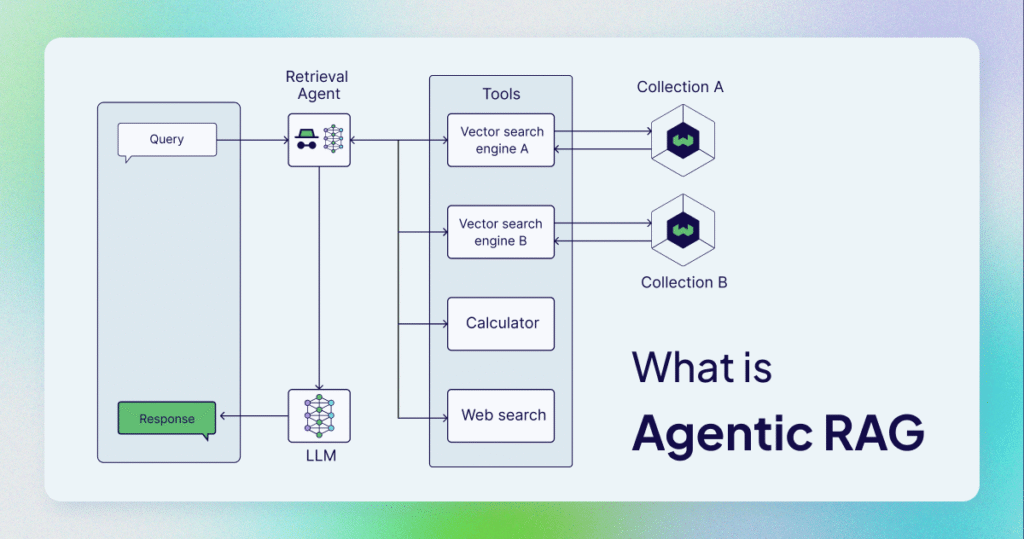
    Image Source: Link

    Not all RAG systems are created equal.

    Most real-world implementations fall into a small number of recurring patterns. Understanding them helps you choose the simplest architecture that solves your problem, instead of defaulting to complexity.

    Simple RAG (Baseline)

    What it is
    The minimal RAG setup:

    • embed documents
    • retrieve top-k chunks
    • inject into prompt
    • generate answer

    When it’s enough

    • small to medium knowledge bases
    • low ambiguity queries
    • internal tools
    • MVPs and prototypes

    Strengths

    • easiest to implement
    • predictable behavior
    • lowest latency and cost among RAG variants

    Limitations

    • retrieval quality directly determines output quality
    • no correction mechanism if the wrong chunks are retrieved

    This is where most people should start.


    RAG with Re-Ranking

    What it is
    A two-stage retrieval system:

    1. fast vector search retrieves many candidates
    2. a re-ranker (often an LLM or cross-encoder) selects the best ones

    Why it exists
    Vector similarity alone is often not enough.
    Re-ranking improves relevance at the cost of extra computation.

    When to use it

    • large or noisy datasets
    • high-stakes answers
    • complex or ambiguous queries

    Trade-offs

    • higher latency
    • higher cost
    • more moving parts

    Re-ranking is about precision, not scale.


    RAG with Tools / Agents

    What it is
    RAG embedded inside an agent loop, where the model can:

    • decide when to retrieve
    • call tools
    • refine queries
    • retrieve multiple times

    How it behaves
    Instead of:

    retrieve → answer

    You get:

    reason → retrieve → reason → retrieve → answer

    When it makes sense

    • multi-step questions
    • investigative tasks
    • research-heavy workflows
    • dynamic decision-making

    Risks

    • unpredictable behavior
    • higher token usage
    • harder debugging

    This pattern trades determinism for flexibility.


    RAG + Workflows (Automation Perspective)

    What it is
    RAG integrated into structured workflows, not free-form chat.

    Examples:

    • conditional retrieval
    • document classification + RAG
    • RAG triggered only at specific steps
    • retrieval feeding downstream automations

    Why it’s powerful
    RAG is used only when needed, not for every interaction.

    Typical stack

    • workflow engine
    • data sources
    • retrieval step
    • LLM step
    • action/output step

    This pattern is ideal for:

    • automation
    • operations
    • repeatable processes

    Often the highest ROI version of RAG.


    Key Insight

    RAG scales best when:

    • retrieval is constrained
    • decisions are structured
    • creativity is limited

    The more “chatty” the system, the harder RAG becomes to control.


    9. Real-World Use Cases (Concrete Examples)

    RAG is most valuable when knowledge access is the bottleneck, not reasoning.

    Below are use cases where RAG consistently delivers real value.


    Internal Knowledge Assistant

    What it solves

    • fragmented documentation
    • tribal knowledge
    • onboarding friction

    Typical sources

    • internal docs
    • SOPs
    • Notion / Confluence
    • PDFs

    Why RAG works here

    • private data
    • frequent updates
    • correctness matters

    This is the most common and safest RAG use case.


    Content Research & Synthesis

    What it solves

    • manual research overhead
    • context switching
    • summarizing large corpora

    Examples

    • article research
    • report synthesis
    • knowledge mapping

    Key benefit
    RAG handles reading, humans handle thinking.


    Client-Specific AI Assistants

    What it solves

    • personalization without retraining
    • data isolation
    • custom knowledge per client

    How RAG helps

    • separate vector stores per client
    • same model, different knowledge
    • controlled access

    This pattern scales consulting and service work.


    Automation + RAG (Docs, Notion, CRM, etc.)

    What it solves

    • repetitive decision-making
    • context-heavy automations
    • manual lookups

    Examples

    • summarizing new documents
    • answering questions about records
    • routing tasks based on retrieved info

    Here, RAG feeds actions, not just answers.


    Where RAG Shines in Solo / Small Teams

    RAG is especially powerful for small teams because it:

    • replaces manual lookup work
    • centralizes knowledge
    • scales expertise without hiring

    Best-fit scenarios:

    • founders
    • consultants
    • educators
    • operators with large knowledge bases

    For small teams, RAG is leverage — when used selectively.


    Key Takeaway

    RAG is not about building smarter AI.
    It’s about connecting intelligence to the right knowledge at the right moment.

    The more structured the problem, the more value RAG delivers.


    10. How to Decide If RAG Is Right for Your Project

    At this point, the goal is not to understand RAG better.
    The goal is to decide intelligently.

    RAG is an architectural choice, not a feature toggle.


    A Simple Decision Framework

    You can reduce the RAG decision to one core question:

    Is access to external knowledge the bottleneck?

    If the answer is no, RAG is likely unnecessary.

    If the answer is yes, continue with the checklist below.


    Questions to Ask Before Implementing RAG

    Before building anything, ask yourself:

    1. Does the model already know this information?
      • If yes → start with prompting.
    2. Is the knowledge private, proprietary, or frequently updated?
      • If yes → RAG may be justified.
    3. How large is the knowledge base?
      • Small → inject directly into the prompt.
      • Large → retrieval becomes useful.
    4. How costly are wrong answers?
      • Low cost → simpler solutions are fine.
      • High cost → grounding matters.
    5. Does latency matter for the user experience?
      • If yes → RAG must be used carefully or selectively.
    6. Is this a one-off task or a repeatable system?
      • One-off → don’t overengineer.
      • Repeatable → RAG may scale well.

    If you cannot clearly justify RAG based on these questions, don’t use it yet.


    The MVP-First Approach (Test Before Scaling)

    The biggest RAG mistake is starting with a “full architecture.”

    A better approach:

    1. Start without RAG
      • Prompting
      • Manual context injection
      • Simple heuristics
    2. Identify the real failure mode
      • Is the model missing information?
      • Is it hallucinating?
      • Is it inconsistent?
    3. Introduce the smallest possible RAG layer
      • limited corpus
      • low top-k
      • clear constraints
    4. Measure improvement
      • accuracy
      • latency
      • cost
      • UX impact

    Only scale RAG after it proves its value.


    Key Insight

    The right time to add RAG is when you can clearly explain
    what problem it solves that simpler approaches cannot.


    11. Final Takeaway — RAG Is a Tool, Not a Religion

    RAG is neither:

    • the future of all AI systems
    • nor an advanced requirement for “serious” projects

    It is simply one tool in a broader architectural toolbox.


    Why Knowing When Not to Use RAG Is Leverage

    Most teams lose leverage by:

    • copying architectures they don’t need
    • adding complexity too early
    • solving imaginary problems

    Restraint is a competitive advantage.

    Choosing not to use RAG:

    • saves time
    • saves money
    • improves reliability
    • simplifies UX

    That decision is often more valuable than implementing RAG correctly.


    The Meta-Skill: Architectural Thinking

    The real skill here is not RAG.

    It’s the ability to:

    • identify constraints
    • reason about trade-offs
    • choose the simplest solution that works
    • revise architecture as requirements evolve

    This mindset applies far beyond RAG — to any AI system, automation, or product.


    What to Explore Next After the Basics

    Once you truly understand RAG, useful next steps include:

    • conditional or hybrid architectures
    • confidence-aware systems
    • evaluation and observability
    • human-in-the-loop workflows
    • cost-aware AI design

    All of these matter more than adding another layer of retrieval.


    12. Mega Recap

    This section can live at the end of the article, or be reused as standalone content.


    Minimal RAG Stack (Conceptual, Tool-Agnostic)

    A minimal RAG system consists of:

    • a knowledge source
    • a chunking strategy
    • an embedding model
    • a vector store
    • a retrieval mechanism
    • an LLM

    No agents. No orchestration. No hype.

    If this version doesn’t work, complexity won’t save it.


    Beginner Mistakes Checklist

    Common RAG mistakes:

    • adding RAG without a clear problem
    • chunking blindly
    • retrieving too many chunks
    • assuming retrieval equals correctness
    • ignoring latency and cost
    • hiding uncertainty from users

    Avoiding these gets you further than most implementations.


    Glossary of Key Terms

    • Embedding — A numerical representation of semantic meaning
    • Vector — The numeric output of an embedding model
    • Vector Database — A system for storing and searching embeddings
    • Chunking — Splitting data into smaller pieces for retrieval
    • Retrieval — Finding relevant chunks based on semantic similarity
    • Augmentation — Injecting retrieved content into the prompt
    • Inference Time — When the model generates a response

    Understanding these concepts matters more than memorizing tools.


    Conclusion (one-liner)

    RAG is powerful — but only in the hands of someone who knows when not to use it.


    This article is how I think.

    In my newsletter, I explore AI architecture, automation, and leverage, not tools, not trends, but decision-making frameworks you can actually reuse.

    If you’re building systems and want fewer opinions and more practical advice, that’s where I write.